A “Server not found” page for Reddit usually means Firefox could not resolve or reach reddit.com, and the cause is often local: an extension, a proxy, secure DNS, or stale cached data.
Start with a private-window test to see whether the problem is limited to Firefox, then clear the cached site data, check extensions and network settings, and flush the system DNS cache if the error survives.
In this guide, I have covered:
Contents
Why Reddit says “Server not found” in Firefox
Reddit fails with “Server not found” while other sites open normally, and you want to know which link in the chain broke. The message means Firefox could not turn reddit.com into an IP address, or it got the address and could not reach the server along the current network path.
Most of the time the cause is local: an extension, a proxy, a secure DNS setting, stale site data, or the DNS cache on your computer. Reddit has outages too, so compare Firefox with another browser or a phone on the same Wi-Fi before you change anything.
Check whether the problem is limited to Firefox
A private window settles the first question: does Reddit load in a clean Firefox session? It uses separate cookies and history from your normal window, and it changes nothing permanent.
- Open a new private window in Firefox with ++, or ++ on macOS.
- Type https://www.reddit.com/ in the address bar and press .
- Load Reddit in another browser on the same computer and compare the result.
If Reddit works in the private window, the problem lives in your regular profile: cookies, site permissions, or an extension. If it fails in both places, the fault is further down the chain, in DNS, the proxy, or the network itself.
Clear Firefox’s cached Reddit data
Reddit loaded a moment ago and now throws the error on every reload. Old cached files or one broken cookie for reddit.com can do that, long after the network recovers. The cleanup is reversible, and it leaves your profile, bookmarks, and saved passwords alone.
- Open the Firefox browser on your computer.
- Click on the More
 menu and select the Settings menu.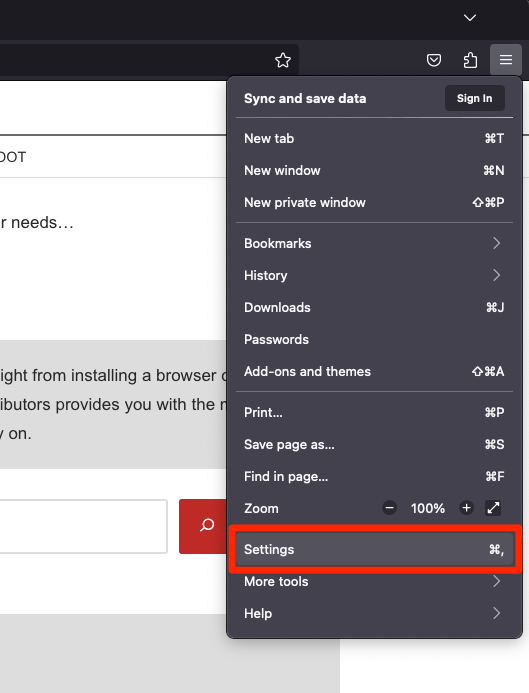
- Switch to the Privacy & Security tab and scroll to the Cookies and Site data section.
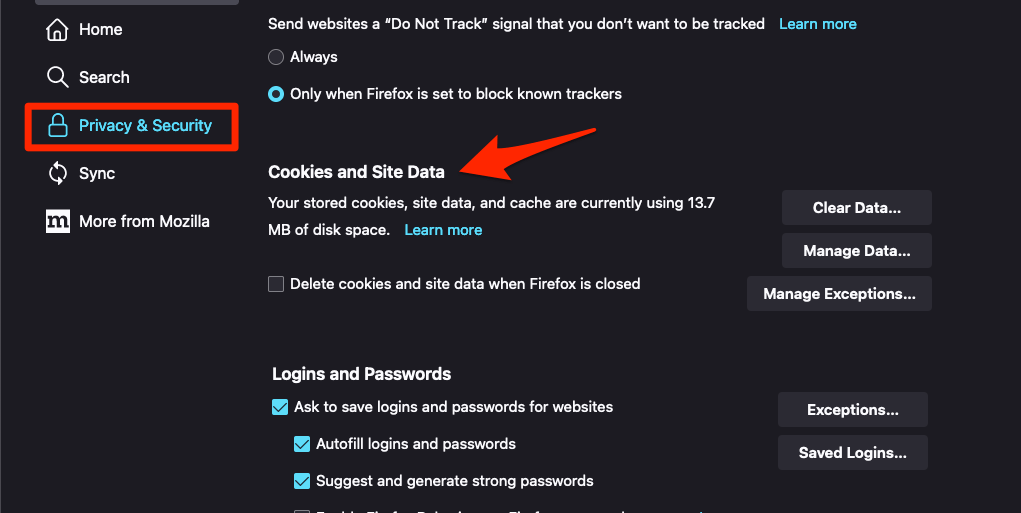
- Click on the button.
- Enable the checkbox for the 'Cookies and Site Data' and 'Cached Web Content' options.
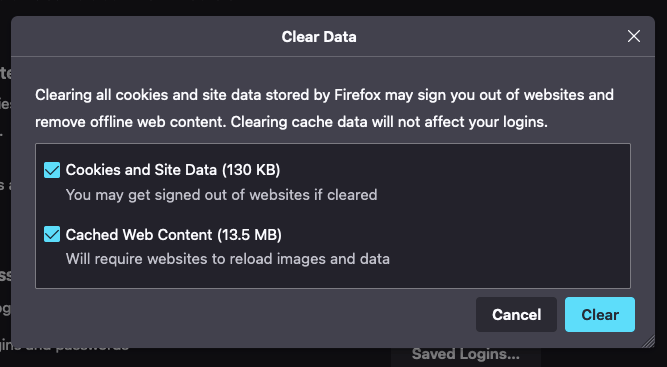
- Hit on the option.
It will immediately delete the cache, cookies, and site data on the browser.
Reload Reddit in a normal tab afterward. You’ll know it worked when the front page or your usual subreddit opens without the error. If the message returns, stop repeating the cleanup and move on to the extension and network checks below. Open the Firefox cache and cookie cleanup guide when you want the step-by-step version of that cleanup.
Run Firefox without extensions
One site failing while the rest of the web loads fine is the classic sign of an extension interfering. Troubleshoot Mode starts Firefox with your add-ons off, so a single restart tells you whether one of them is involved.
- Click the hamburger menu at the top right of Firefox.
- Click Help.
- Select Troubleshoot Mode….
- Click Restart in the confirmation dialog.
If Reddit loads there, an extension or a profile setting is to blame. Reopen Firefox normally, disable extensions one at a time, and reload Reddit after each change. You’ll know it worked when the error appears exactly when a particular add-on comes back on.
Review Firefox’s network settings
Reddit fails in Firefox while other browsers are fine. That pattern points at how Firefox routes its traffic. It can be told to use a proxy or to resolve hostnames through a secure DNS provider, and either setting can cut one site off.
- Click the menu, choose Settings, and open General.
- Scroll to Network Settings and click Settings….
- Check whether Use this proxy server is on. Switch it off unless you deliberately use one.
- Click to save.
Load Reddit again. If it still fails, open Privacy & Security → Security and find Enable secure DNS using:. Turn it off for a test, or pick a different provider, then reload the page.
When Reddit loads in another browser but not in Firefox, one of these two settings is usually the reason.

Do not change secure DNS or proxy settings on a managed work or school network. Ask your network administrator which DNS and proxy configuration that network requires.
Flush the computer’s DNS cache
You have changed the Firefox settings and nothing moved. The stale address is probably cached below the browser, in Windows, macOS, or Linux, and Firefox has no flush button of its own.
Windows
- Open Command Prompt as an administrator.
- Run ipconfig /flushdns.
- Close Firefox completely, reopen it, and load Reddit.
macOS
- Open Terminal.
- Run sudo dscacheutil -flushcache.
- Run sudo killall mDNSResponder and enter the administrator password when prompted.
- Quit and reopen Firefox, then retry Reddit.
Linux
- Open Terminal.
- Run resolvectl flush-caches.
- Restart Firefox and try loading Reddit.
If a command reports that the service or command is unavailable, the resolver on your machine is configured differently. Use the DNS settings your network or internet provider supplies, and check Mozilla’s Firefox support pages for the browser-side connection checks.
Check for a proxy or hosts-file override
Reddit loads on your phone over the same Wi-Fi but not on the computer. That points at something on the machine itself. A manual proxy in the system settings or a forgotten hosts-file entry will do exactly that.
- Open the operating system’s network or Internet settings and review the proxy fields.
- Set the proxy to automatic or off, matching your network’s normal configuration.
- Open the system hosts file in a text editor and look for entries containing Reddit hostnames.
- Remove any entry you know was added on purpose, save the file, and restart Firefox.
Leave the hosts file alone unless you understand why the entry exists. A wrong line can send Reddit and other sites to an address that never answers, and you end up chasing the same error from another direction.
Try a fresh Firefox profile
Nothing above helped, so the remaining suspect is the profile itself. A temporary profile gives you a clean Firefox with default settings, which shows whether the problem travels with your data or sits outside the browser.
Before you start, confirm your bookmarks, passwords, and open tabs are reachable through Firefox Sync or a backup.
- Click the menu and select Help → More Troubleshooting Information.
- Find the Profiles section and click Open Folder to locate your profile files.
- Use Firefox’s profile controls to start a temporary profile for a clean test.
- Load Reddit in that profile without adding extensions or changing system settings.
If Reddit works in the temporary profile, your regular profile is damaged or carries a setting you have forgotten about. If it still fails, the browser is not the problem. Look at the network, the DNS service, the proxy, or Reddit’s own availability.
Final checks and how to confirm the fix
You think the fix landed, and now you want to be sure it holds. Close the Reddit tab, open a new one, and load the address again after every change. A fresh tab stops a cached error page from making a working fix look broken.
When the page does load, keep that last change and re-enable extensions one at a time so you know what caused it.
For a closer look, type about:networking in the address bar. Firefox shows whether it is issuing DNS lookups and whether the connection dies before or after the name resolves, which usually narrows the cause in seconds.
If Reddit fails again on a different network, stop changing Firefox settings. The site may be down, or the network may be blocking it.

Frequently Asked Questions
Why does Reddit say “Server not found” in Firefox?
Firefox cannot resolve Reddit’s address or cannot reach it along the current network path. An extension, proxy, secure DNS setting, cached data, or the operating system’s DNS cache is usually behind it.
Should I clear all of my Firefox browsing data?
No. Start with the cache and cookies for the site, because that cleanup is reversible and leaves your profile intact. If Reddit still fails, test the network settings instead of clearing unrelated data.
Does Firefox have a DNS flush button?
No. Flush the DNS cache with the Windows, macOS, or Linux command, then restart Firefox completely. The about:networking page shows whether Firefox is still failing on the lookup.
Can Reddit be down while Firefox is working normally?
Yes. When Reddit fails in every browser and on every device on the same network, the service is probably unavailable. Wait a while, or test on mobile data to confirm.
Will disabling secure DNS solve the Reddit error?
It can, if your current secure DNS provider cannot resolve Reddit. On a managed work or school network, keep the DNS configuration the organization requires and ask an administrator.