Chrome 157 has reached the stable channel for desktop users on Windows, Mac, and Linux, and the rollout will take days or weeks to reach everyone.
Linux is listed as 157.0.8103.38 and Windows and Mac as 157.0.8103.38/.39. Open chrome://version to see what you have, and chrome://settings/help to pull the update early.
In this guide, I have covered:
Contents
Chrome 157 Hits the Stable Channel
Your browser may already be nudging you to restart, or it may still be sitting on an older build. Chrome 157 has moved to the stable channel for desktop users on Windows, Mac, and Linux, and the official Chrome release announcement says it will roll out over the coming days and weeks.
Scope first: this is desktop only. The announcement lists no Chrome 157 builds for Android or iPhone, so phone and tablet users have nothing to check yet.
| Platform | Chrome 157 version |
|---|---|
| Linux | 157.0.8103.38 |
| Windows and Mac | 157.0.8103.38/.39 |
So what actually changed? Chrome 157 contains a number of fixes and improvements, and the post points to the log for the list. Separate Chrome and Chromium blog posts will cover the new features and major efforts delivered in version 157.
When Chrome 157 Will Reach Your Computer
Wondering why a colleague already has Chrome 157 and your machine doesn’t? The rollout is phased over the coming days and weeks, so two computers on the same network can update on different days.
Nothing is broken when that happens. Your machine simply sits further back in the queue, and Chrome will pick the update up on its own.

If Chrome 157 is not available yet, wait and check again later. Stable releases reach computers gradually over the coming days and weeks.
You’ll know it worked when chrome://version reports the build listed for your platform instead of the previous one.
How to Check Your Chrome Version
Not sure whether the update already landed? Chrome answers that in about ten seconds, with no restart needed.
- Open a new tab in Chrome.
- Type chrome://version in the address bar.
- Press to open the version page.
- Read the version number next to Google Chrome.
Linux should show 157.0.8103.38. On Windows and Mac, the announcement lists 157.0.8103.38/.39.
No match? The update hasn’t reached you yet. The manual check below is the next step.
How to Update Chrome on Windows, Mac, or Linux
Still on the previous build and tired of waiting? You can pull Chrome 157 down yourself. Open chrome://settings/help or follow the steps below.
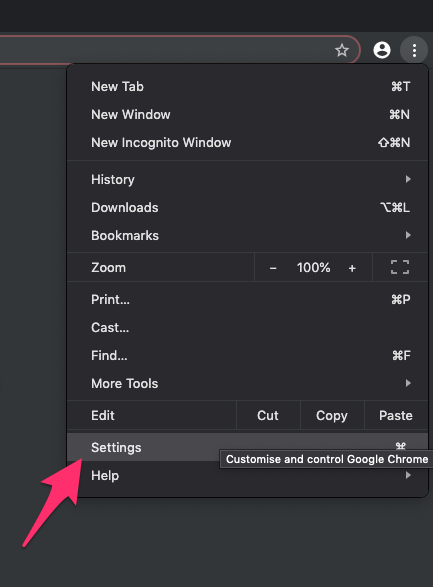
- Launch the Google Chrome on your computer.
- Click on More
 for the options list, and select the Settings menu.
- Switch to the About Chrome tab in the left sidebar pane.
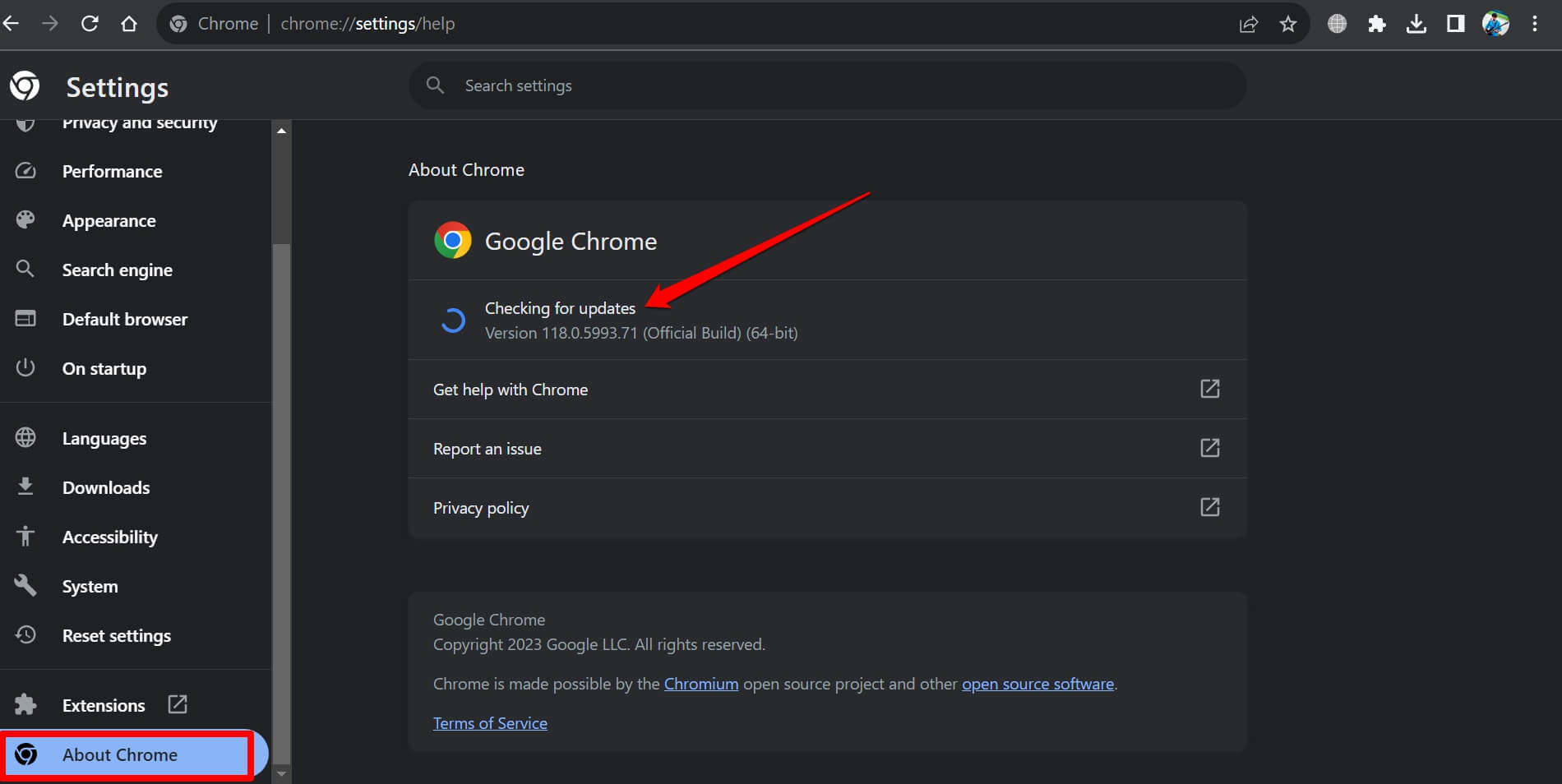 The browser should automatically start looking for the latest updates.
- Hit on the button.
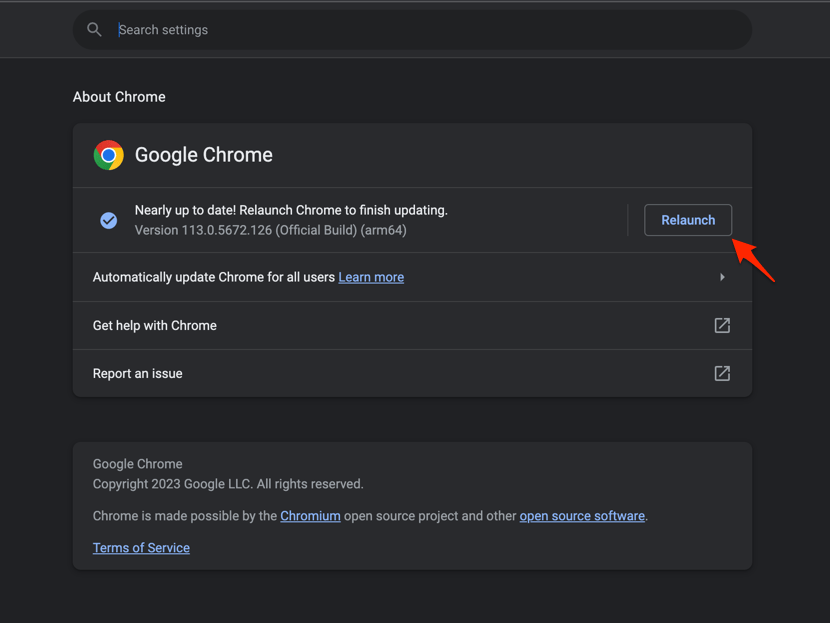 It will complete the Chrome browser update process.
Chrome downloads the update in the background. When the download finishes, a button appears in the same panel. Click it to restart the browser.

TIP: Opening chrome://settings/help starts the update check the moment the page loads. There is nothing else to click to begin.
Your tabs, bookmarks, and any website shortcuts you created on the desktop stay where they were. The only visible change is the version number.
You’ll know it worked when chrome://version shows the build listed for your platform. If the old number is still there, restart Chrome once more and check again.

Frequently Asked Questions
A few quick answers to the questions this release raises.
When will Chrome 157 arrive on my computer?
Chrome 157 is rolling out to desktop users on Windows, Mac, and Linux over the coming days and weeks. Your computer may receive it later than another system because the stable release is phased.
Which Chrome 157 builds are listed?
Linux is listed as 157.0.8103.38. Windows and Mac are listed as 157.0.8103.38/.39.
How do I check whether Chrome 157 is installed?
Open chrome://version and read the number beside Google Chrome. It should match the build listed for your platform.
Does this promotion cover Android or iPhone?
No. This announcement covers desktop Chrome on Windows, Mac, and Linux, and lists no Android or iPhone builds.
What changes are included in Chrome 157?
Chrome 157 contains fixes and improvements, and the release post points to the log for the full list. Separate Chrome and Chromium blog posts will cover new features and major efforts delivered in version 157.
Short version: check chrome://version first, and if the build is still old, run the manual check in chrome://settings/help. The rest is waiting for the phased rollout to reach you.