If Firefox does not save tabs when the browser closes, the Open previous windows and tabs toggle in Settings is usually the cause. Turn that checkbox back on, then confirm the browser.startup.page preference is set to 3 in about:config.
If a session was already lost, you can restore previous windows from the History menu, update Firefox, and pull an older session back from your profile folder.
In this guide, I have covered:
Contents
Why Firefox Does Not Save Tabs When the Browser Closes
You close Firefox expecting your tabs to come back, but the next launch starts blank. Session restore is the built-in feature that puts your windows and tabs back after a restart, and when it is off or blocked, every close can wipe your place.
Common triggers include the “Open previous windows and tabs” toggle being disabled in Settings, a custom browser.startup.page value, a corrupt session file, or an outdated Firefox build with a known bug. For more background, see the original discussion on Mozilla support.

If your Firefox startup page is also showing a different homepage (like a blank page or a single URL) instead of the tabs you had open, the cause is almost always the same checkbox covered below.
Turn On “Open Previous Windows and Tabs” in Firefox Settings
This single checkbox is the on and off switch for tab saving in Firefox, so it is the first thing to check.
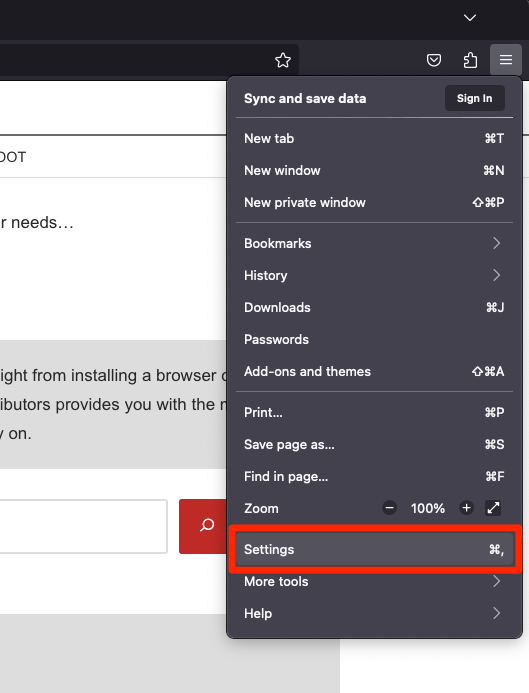
Click the hamburger menu  at the top right of Firefox, then choose . The General panel opens by default. Under the Startup heading, tick the checkbox labeled Open previous windows and tabs. Then close the Settings tab.
You can also reach this panel directly by typing about:preferences#general in the address bar. The setting sits under the Startup heading on that page.
Some Firefox installs (especially managed or ESR) hide this checkbox because the administrator locks it. If you cannot toggle it, skip to the about:config section below to confirm the value, then to the reset section at the end of the article.
Check the Startup Value in about:config
If the checkbox is greyed out, or you want to verify the underlying preference, open about:config.
Type about:config in the address bar and press Enter. Accept the warning that appears. Search for browser.startup.page and confirm the value is 3.
The value 3 means “show my windows and tabs from last time”. A value of 0 opens the home page, 1 opens the Firefox home page, and 2 opens a blank page.
If the value is anything else, change it to 3. Right-click the preference, choose , enter 3, and click the checkmark to save.
Keep Crash Recovery Enabled for Forced Shutdowns
Firefox has a separate preference for restoring tabs after an unexpected crash. If this one is off, a forced shutdown (such as a power loss or a system reboot after a hang) wipes your session even though the startup checkbox is on.
Open about:config and search for browser.sessionstore.resume_from_crash. The default is true, which is what you want. Set it back to true if a third-party tweak or extension has flipped it to false.
Restore the Previous Session From the History Menu
If Firefox already closed without saving, you may still be able to recover the lost tabs from the History menu. The same menu is also where you clear browsing history in Firefox, so the restore options sit a few items above the clear option.
Click the hamburger menu , hover History, and look for . Click it once and the last saved window with its tabs should reopen. You can also click or to reopen individual tabs or a specific window.

TIP: If you do not see Restore Previous Session, Firefox did not save a session before closing. Skip ahead to the Profile Folder section to look for an older backup file.
Update Firefox to the Latest Version
Older Firefox builds had bugs where the session was not flushed to disk on a clean quit. Updating fixes that behavior and also gives you the latest security fixes.
- Open the Firefox browser app on your computer.
- Click on the More menu and select the Settings menu.
- Scroll down to the Firefox Updates section within the General tab, and click the button.
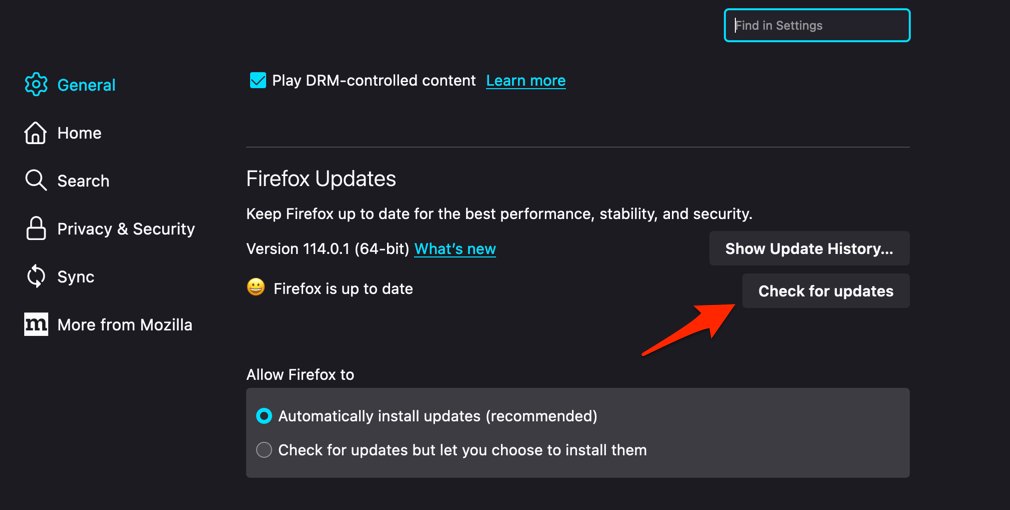
- Firefox will check for updates and download them. It may ask to restart to complete the installation of the update.
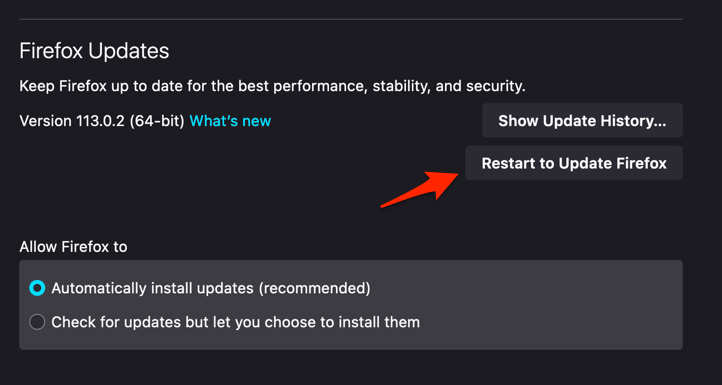 The browser will be updated to the latest version.
After Firefox restarts, open the tabs you want to keep, close Firefox normally through the X button, and reopen it. You’ll know the update fixed the issue when those tabs come back on their own.
Reset Firefox if the Setting Will Not Stick
If the checkbox turns itself off again after restart, an extension or a corrupted profile is likely interfering. Resetting Firefox restores default preferences and disables extensions while keeping your bookmarks, saved logins, and history intact.
The fastest way is to type about:support in the address bar, find the Refresh or Reset option on the right side of the page, and confirm the prompt. Firefox restarts with default settings. Re-enable the Open previous windows and tabs checkbox after the reset.

Recover Lost Tabs From the Profile Folder
Firefox writes a backup of your session to a file in your profile folder every 15 seconds by default. Even if the latest session was lost, an older copy may still be there.
Type about:support in the address bar and click next to Profile Folder. Look for files named sessionstore.jsonlz4 and previous.jsonlz4. These are compressed session backups.
Make a copy of previous.jsonlz4 somewhere safe, then rename the copy to sessionstore.jsonlz4 in the same profile folder, overwriting the existing one. Close Firefox completely, then reopen it. Your tabs from the backup session should reappear. If Firefox behaves oddly after this, you may also want to clear the cookies and cache in Firefox.

ALERT: Renaming and overwriting session files is a manual recovery step. It works, but if the file is corrupted Firefox may fail to start. If that happens, close Firefox, delete the renamed file, and let Firefox recreate a fresh sessionstore.
Frequently Asked Questions
Why does Firefox open with a blank homepage instead of my tabs?
That usually means Open previous windows and tabs is unchecked in Settings, or browser.startup.page in about:config is set to 0, 1, or 2 instead of 3. Follow the steps above to set both back to their defaults.
Will Firefox save tabs if I force quit it?
Yes, but only if browser.sessionstore.resume_from_crash is true and the session backup is recent. Firefox normally writes a backup every 15 seconds, so a force quit only loses at most the last 15 seconds of tab activity.
How do I find tabs from a session I lost days ago?
Open about:support, click Open Folder next to Profile Folder, and look for the sessionstore-backups folder. Inside there are files such as recovery.jsonlz4, recovery.baklz4, and older dated backups that can sometimes be renamed and restored.
Does Private Browsing save tabs on close?
No. Private windows always start fresh, and closing Firefox wipes any tabs that were only open in Private Browsing. To keep tabs across restarts, use a regular window. If you want to combine the two, see how to open a Private Window and new tabs in Firefox on the Computer.
Can a Firefox extension stop tabs from saving?
Yes. Some tab and session management extensions override the built-in session restore. Disable all extensions temporarily from about:addons, restart Firefox, and see if the built-in behavior returns.