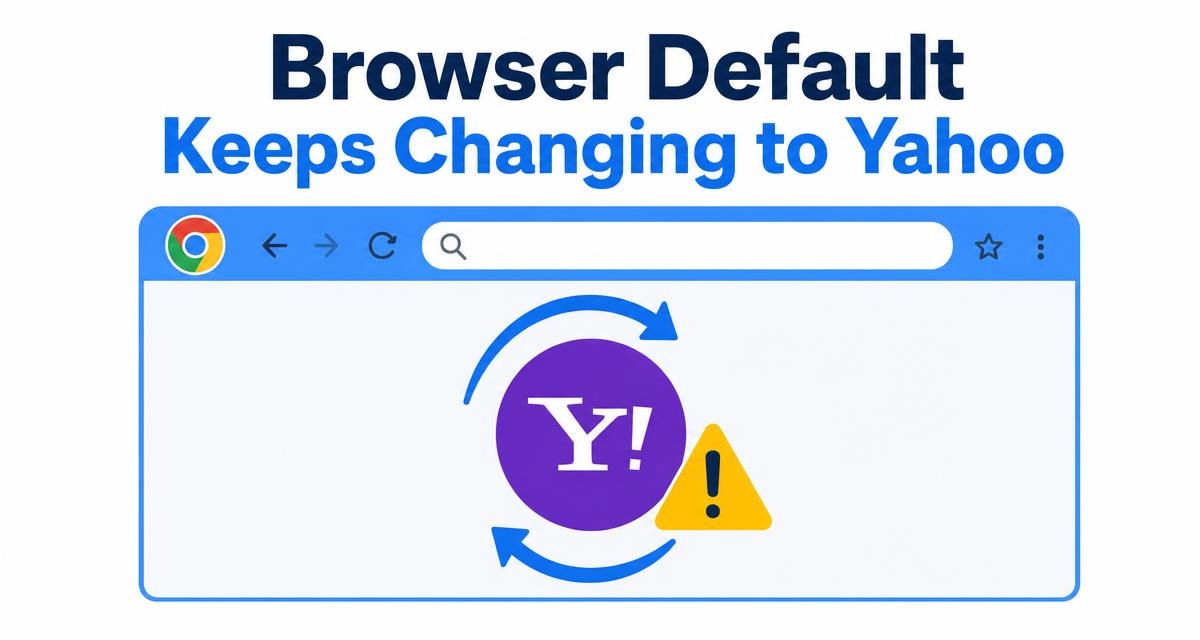
Yahoo Mail, Yahoo Search, and the Yahoo homepage can all stop loading in Chrome even when other sites open fine. The cause is almost always local to your browser: a corrupted cookie, a privacy extension, a blocked third-party cookie, or a hijacked shortcut.
Work through the fixes in the same order: Incognito test, cookies and cache, extensions, third-party cookies, Chrome update, DNS flush, malware scan, and a Chrome reset. Stop as soon as Yahoo loads again.
In this guide, I have covered:
Contents
Why Yahoo not working in Chrome is usually a browser problem
Yahoo not working in Chrome usually means Yahoo Mail, Yahoo Search, or the Yahoo homepage stops loading, signing in, or syncing. The cause is almost always local to the browser, not Yahoo itself. Stale cookies, an over-aggressive privacy extension, Chrome’s third-party cookie block, or a hijacked shortcut can all break Yahoo even when other sites work fine.
The fixes below start with the quickest diagnostic and move toward a full Chrome reset. Try them in order and stop as soon as Yahoo starts working again.
Check whether Yahoo is actually down
Before you change any Chrome settings, make sure Yahoo itself is reachable. Open a different browser on the same computer, or visit Yahoo on your phone over mobile data, and try the same action. If Yahoo fails everywhere, the issue is on Yahoo’s side and Chrome cannot fix it until service returns.
You can also check a public outage tracker or visit Yahoo’s help center to see if Yahoo is reporting problems at the moment.
Open Yahoo in an Incognito window
An Incognito window is the fastest way to tell whether the problem lives in your regular Chrome profile. It loads Yahoo with no extensions and a fresh cookie jar. If Yahoo works there, an extension or a corrupted cookie is the likely cause.
- Launch the Google Chrome on your computer.
- Click on the More
 menu for the list.
 - Select the New Incognito Window option.
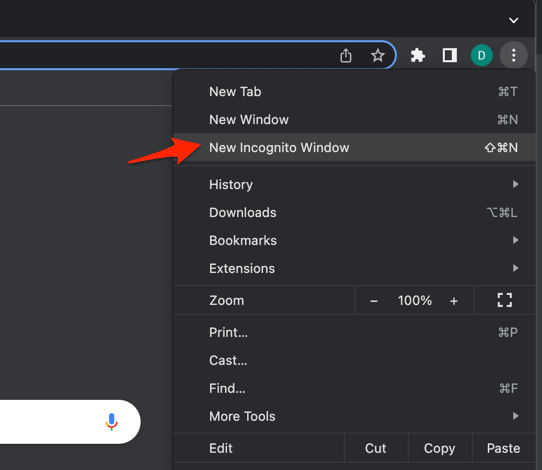 It will start a new incognito window in the browser.
If Yahoo loads correctly in Incognito, jump to the Disable Chrome extensions and Clear Chrome’s cookies and cache sections below. If it does not load in Incognito either, the problem is more general, so keep going down the list.
Clear Chrome’s cookies and cache
Yahoo keeps you signed in through cookies, and a corrupted or expired cookie can break the login flow or stall the inbox. Clearing Chrome’s cookies and cache forces a clean sign-in the next time you open Yahoo.
- Open the Google Chrome on your computer.
- Click on the More for menu options, and hover on the More Tools menu.
- Select the Clear Browsing Data... sub-menu from the list.
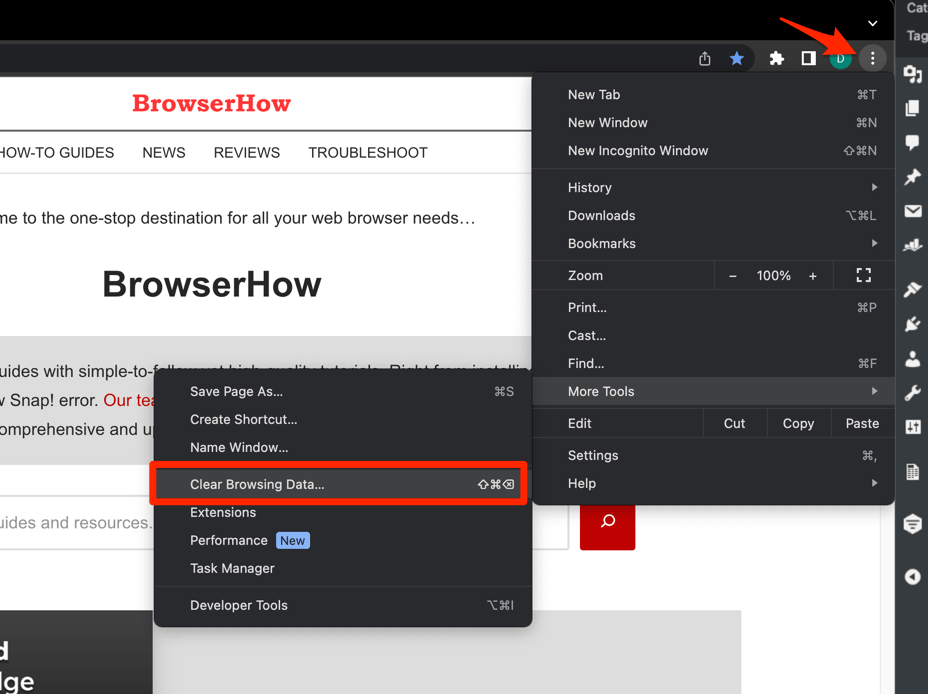 It will open the Clear browsing data settings window.
 - Choose the Time Range from the drop-down and select the checkboxes for the 'Cookies and other site data' and 'Cached images and files' options.
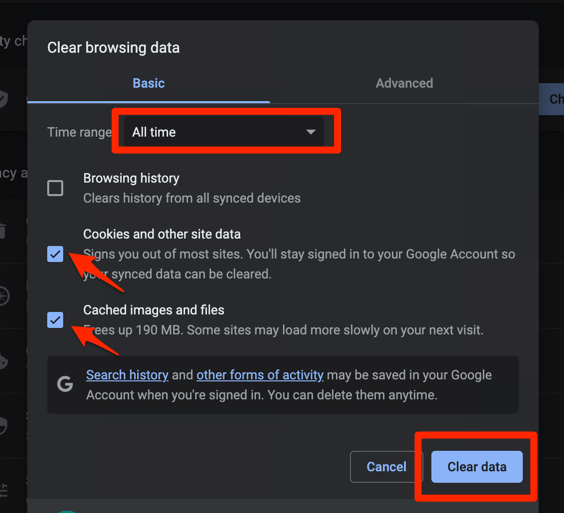
- Finally, hit the command button.
It will delete the stored cookies and cache data from your Chrome browser.

Clearing cookies signs you out of every site, not just Yahoo. Finish any unsaved work in other tabs first.
Once Chrome finishes clearing, reopen Yahoo and sign back in. Yahoo should load normally.
Clear all Chrome browsing data
If a single-site cookie clear did not help, wipe the full browsing data set. This also flushes the in-memory cache that holds broken page assets. In the Clear browsing data dialog, make sure the checkbox labeled Cookies and other site data is checked, along with Cached images and files.
- Go to chrome://history/clearBrowserData in the address bar.
- Select the Time range from the drop-down.
- Enable the checkboxes for Browsing history, Cookies and other site data, and Cached images and files.
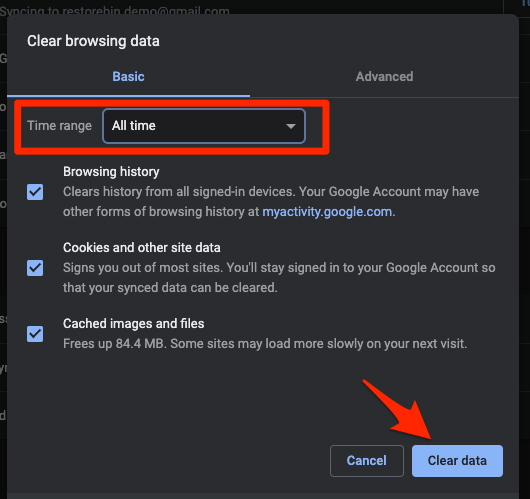
- Hit the Clear data button.
Reopen Chrome and try Yahoo again. You will be signed out of every site, and Chrome treats it as a fresh install until you sign in.
For a lighter touch that only clears history, see our Chrome browsing history guide.
Disable Chrome extensions
Ad blockers, script blockers, privacy tools, and corporate VPNs are the most common reason Yahoo Mail login screens hang or Yahoo Search returns a blank page. Disabling them takes a minute and tells you whether one of them is interfering.
- Launch the Google Chrome on your computer.
- Click on the More for the list menu.
- Hover on the More Tools menu and choose the Extensions sub-menu.
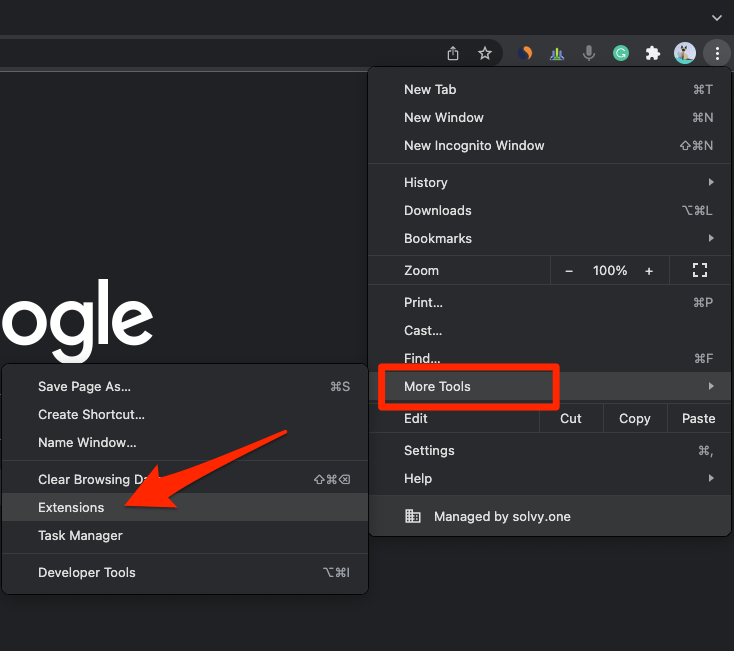 It will open the Chrome Extensions Manager page with the list of installed extensions.
 - Toggle the switch to Disable the extension.
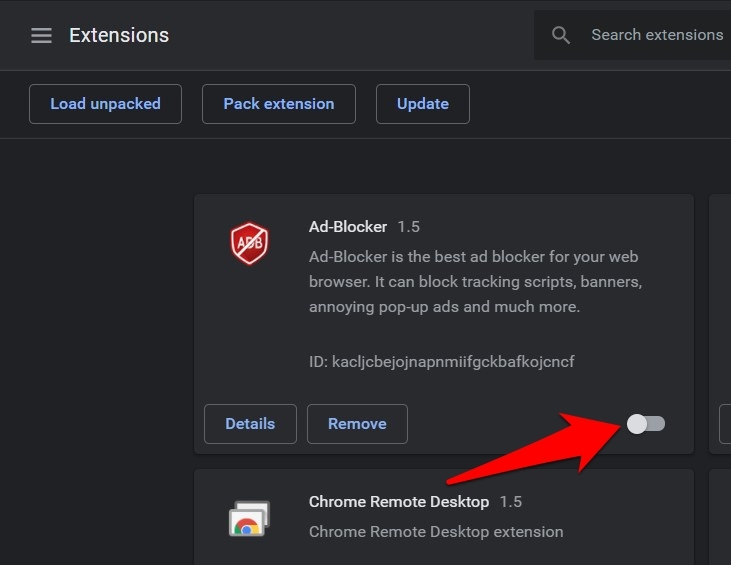

TIP: Start with the obvious suspects: uBlock Origin, AdBlock, Privacy Badger, NoScript, and any VPN or “secure DNS” extension. Re-enable them one at a time to find the culprit.
If Yahoo starts loading with extensions off, turn them back on one by one. As soon as Yahoo breaks again, the extension you just re-enabled is the cause. You can then keep it disabled for Yahoo or add a per-site exception.
Allow third-party cookies for Yahoo
Chrome blocks third-party cookies by default in Incognito, and some Yahoo pages still rely on them to complete sign-in or load embedded content. If you are signed in but the inbox is blank, or the sign-in page reloads in a loop, allow third-party cookies for Yahoo specifically.
- Click at the top right of Chrome and choose Settings.
- Select Privacy and security in the left sidebar.
- Click Site settings.
- Click Third-party cookies.
- If the toggle is set to Block third-party cookies, switch it to Allow third-party cookies or Block third-party cookies in Incognito mode.
- Close the tab and reload reddit.com.
Under Third-party cookies, open See all site data and permissions, search for “yahoo.com”, and remove any old entries. Then add [*.]yahoo.com as an allowed site so the sign-in flow can complete. You’ll know it worked when the sign-in page stops looping and the inbox opens.
Update Chrome to the latest version
An outdated Chrome can miss fixes for known Yahoo Mail bugs, certificate issues, and rendering problems. Chrome usually updates itself in the background, but a stalled update can leave you running an old build.
- Launch the Google Chrome on your computer.
- Click on More for the options list, and select the Settings menu.
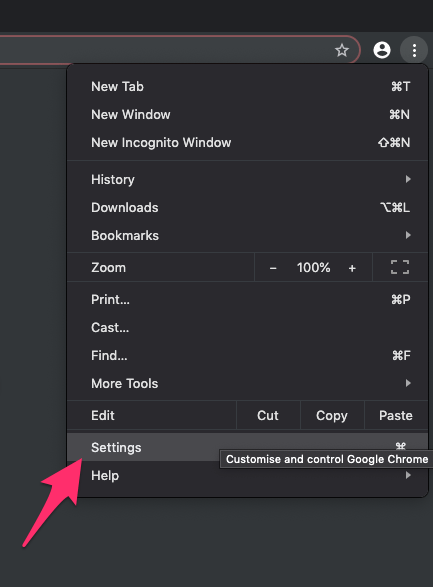
- Switch to the About Chrome tab in the left sidebar pane.
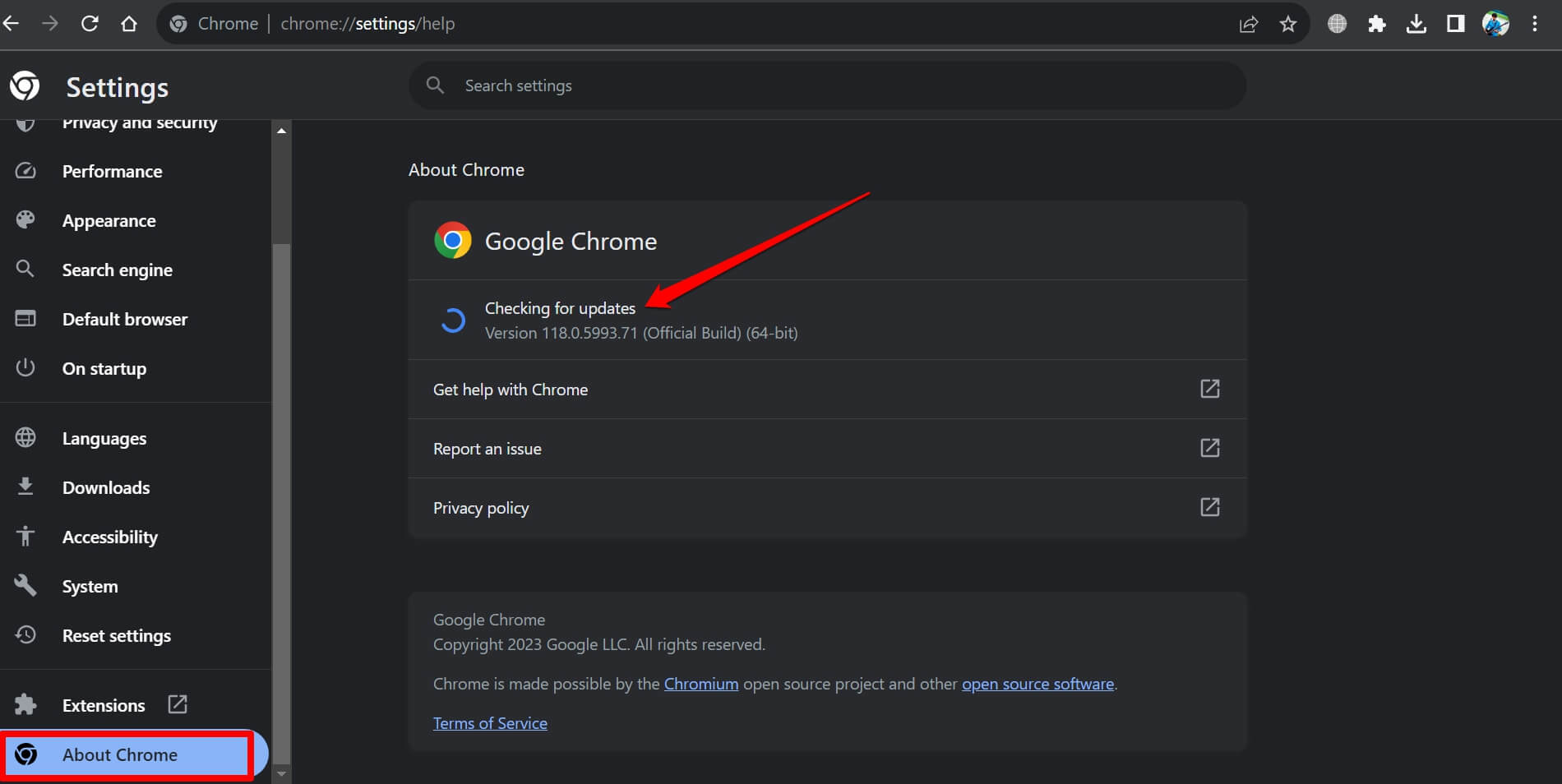 The browser should automatically start looking for the latest updates.
 - Hit on the button.
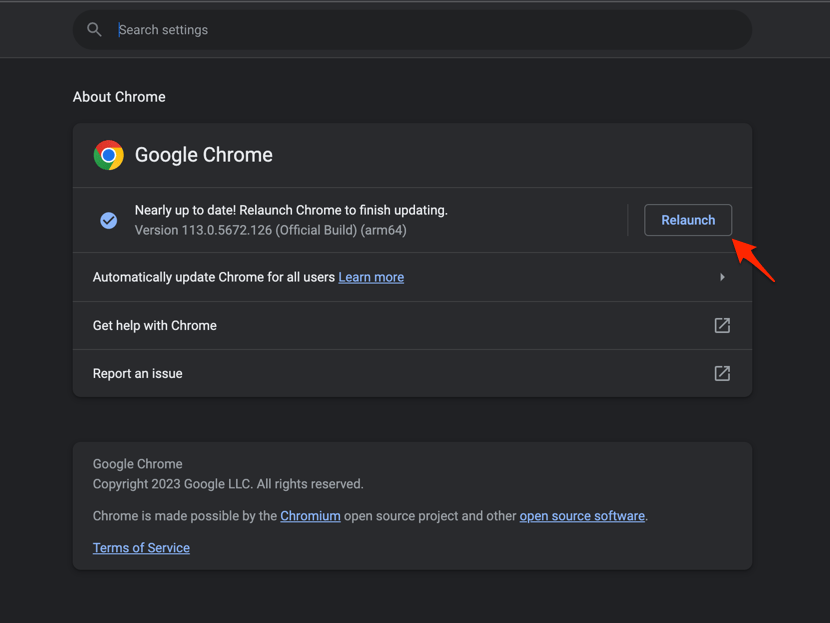 It will complete the Chrome browser update process.
Restart Chrome after updating so the new version actually loads. Try Yahoo again before moving to the next step.
Clear Chrome’s DNS cache
If Yahoo loads on another browser but not in Chrome, Chrome’s internal DNS cache may be holding a stale record. Flushing it forces Chrome to look up the Yahoo domains again.
- Launch Google Chrome on your Computer.
- Type in chrome://net-internals/#dns in the address bar, and hit key.
It will open the Chrome DNS network page. - Hit the command button.
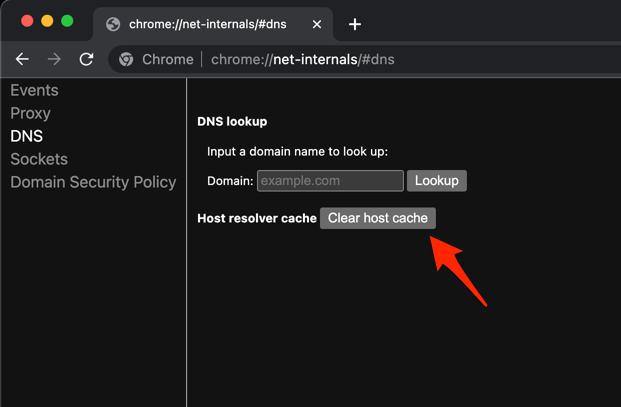
- Relaunch the Chrome browser.
It will clear the Chrome DNS host cache.
You can also try disconnecting from the network for a few seconds and reconnecting, which has the same effect on a wider scale. You’ll know it worked when Yahoo loads without a “site can’t be reached” warning.
Scan for malware
Browser hijackers and adware can silently redirect Yahoo searches, replace the Yahoo homepage, or block Yahoo from loading at all. If Yahoo search results keep pointing at the wrong site, or the Yahoo URL keeps changing, run a full scan.
- Open the Start menu and click Settings
 .
. - Go to Privacy & security, then Windows Security.
- Click Virus & threat protection, then Scan options.
- Choose Full scan and click Scan now.
- Quarantine or remove anything Windows Defender flags.
- Restart Windows when the scan finishes and test Chrome again.
You’ll know it worked when Yahoo stops redirecting and the homepage loads cleanly.
Reset Chrome settings
If Yahoo is still broken, reset Chrome to its default state. This disables all extensions, resets your startup page, search engine, and pinned tabs, and clears temporary site data. It does not delete your saved passwords or bookmarks.
- Launch the Chrome browser on the computer.
- Click on the More for menu list, and select the Settings menu.
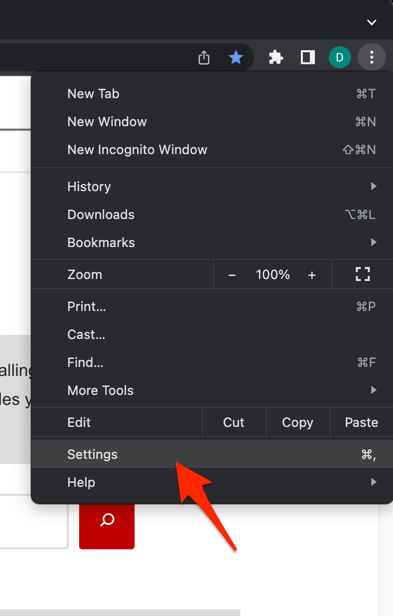 It will open the Chrome browser's Settings page.
 - Switch to the Reset settings tab in the left sidebar, and select Restore settings to their original defaults option.
- Finally, hit the command button.
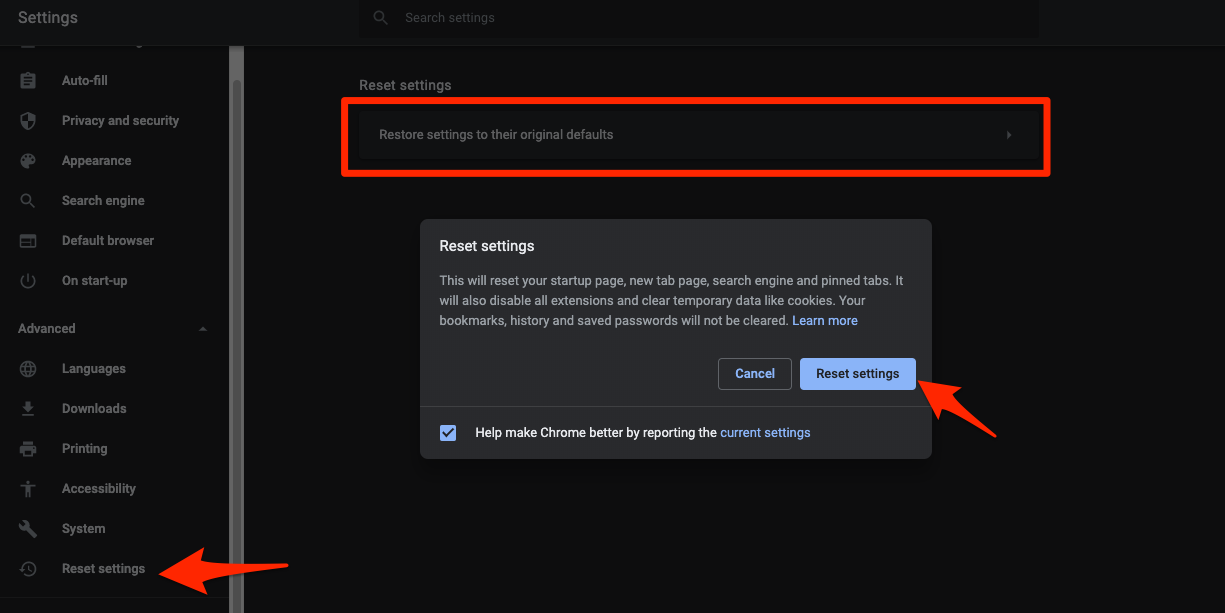 It will reset the Chrome browser settings, clear temporary data, and disable all extensions.
The current path in Chrome is Settings → Reset settings → Restore settings to their original defaults → Reset settings. The older “Show advanced settings → Reset” entry no longer exists.
Open Yahoo after the reset. If it works, re-enable your extensions one at a time as before.
Reinstall Chrome as a last resort
If nothing above fixed Yahoo, the Chrome installation itself is likely corrupted. Reinstalling gives you a clean copy without touching your profile data on Google’s servers.
- Uninstall Chrome through Settings → Apps → Installed apps.
- If the profile folder remains at %LOCALAPPDATA%GoogleChromeUser Data, delete it manually.
- Restart Windows.
- Download a fresh copy of Chrome and install it.
- Set Chrome as your default browser, then set your default search engine again.
After reinstalling, sign in to Chrome so your bookmarks, passwords, and extensions sync back, then test Yahoo one more time. If Yahoo works now, stop here.

Frequently Asked Questions
Why does Yahoo keep logging me out in Chrome?
Chrome may be deleting Yahoo’s cookies on exit, or an extension may be wiping them. Clear Chrome’s cookies once, sign in to Yahoo, and avoid running a cookie-clearing extension on Yahoo tabs. If other browsers keep you signed in but Chrome does not, the issue is almost always local to Chrome.
Will clearing Chrome’s cookies delete my Yahoo emails?
No. Yahoo Mail stores your messages on Yahoo’s servers, not in Chrome. Clearing Chrome’s cookies only removes the small token that keeps you signed in, and your inbox is exactly as you left it after you sign back in.
Does Yahoo work in Chrome’s Incognito mode?
Yes, but with limits. Yahoo Mail, Search, and the homepage all open in an Incognito window, but extensions are disabled and third-party cookies are blocked by default. If Yahoo fails only outside Incognito, the cause is an extension or a privacy setting in your normal profile.
How do I make Yahoo my default search engine in Chrome?
Open Settings from the three-dot menu , choose Search engine on the left rail, then pick Yahoo from the Search engine used in the address bar dropdown. Chrome will then handle searches from the address bar through Yahoo.
Is Yahoo down right now?
Try Yahoo on a different device, network, or browser. If Yahoo fails everywhere at the same time, it is almost certainly a Yahoo-side outage and no browser setting will help until service is restored.