A blank Reddit page, an endless spinner, or a sign-in that never sticks usually points at your Safari session rather than the site. The same Reddit URL often opens fine in Chrome or in a private tab.
Start with Safari's per-site controls for reddit.com, then clear stored website data, rule out extensions and tracking protection, and test another network before you assume Reddit is down.
In this guide, I have covered:
Contents
Why Reddit Stops Working in Safari
Reddit loads in Chrome but not in Safari. Or the home page appears and the comments never do. Or you sign in and land right back on the login screen. Those are all “Reddit not working” reports, and they do not share one cause.
The site itself is rarely to blame. Saved website data, blocked cookies, an ad blocker, tracking protection, or a network filter can break Reddit while every other site still loads fine. Start with one quick comparison, then work from Safari’s per-site controls to its browser-wide settings.
Check Whether the Problem Is Safari or the Connection
Before you change a setting, find out where the failure lives. Four quick tests narrow it down.
- Open https://www.reddit.com in Safari.
- Open another website that normally works in Safari.
- Open Reddit in another browser on the same device.
- Open Reddit on another device connected to the same network.
- If Reddit fails only in Safari, continue with the permissions and extension checks below.
- If Reddit fails in every browser on this device, work through the cookie and tracking checks below before assuming the site is down.
- If it fails on every device using the same network, the restriction may come from the network, VPN, content filter, or Reddit’s availability in your region.
Reddit is unavailable in some regions. If it fails on every browser, device, and network you try, Safari settings will not bring it back.
Reload Reddit and Try the Desktop Site
A tab left open overnight can go stale, and the mobile layout sometimes fails where the desktop one loads.
- Click the reload
 icon in Safari’s address bar.
- Open Safari’s page menu next to the address bar.
- Select Request Desktop Website if the option is available.
- Wait for the Reddit home page to finish loading.
If the desktop site appears, Safari keeps that choice for reddit.com in the current tab. If nothing loads either way, the layout is not the problem, so read on.
Test Reddit in Private Browsing
This is the fastest test available. A private window starts without your saved cookies, cache, or most site data.
- Open the Safari app on your Mac.
- Choose File → New Private Window.
- Open https://www.reddit.com in the new window.
- Try loading a feed and signing in.
A working Reddit here is useful information. It means your normal window holds something broken: old cookies, a site permission, or an extension. See How to Open Private Browsing Mode and New Tabs in Safari on Mac for the complete workflow.

TIP: Private Browsing is a test, not a permanent home for Reddit. Keep that window open while you work through the fixes below, so you can check each one against a clean session.
On iPhone or iPad
- Open Safari.
- Open Safari’s page menu.
- Select Private Browsing.
- Open Reddit.
If Reddit appears in Private Browsing, switch back to normal browsing and continue with the fixes below.
Reset Reddit’s Website Permissions
Safari’s per-site menu controls pop-ups and content blocking for one website at a time. That makes it the right place to look before you touch global settings.
- Open https://www.reddit.com in Safari.
- Open Safari’s page menu next to the address bar.
- Select Website Settings.
- Set Pop-ups to Allow temporarily.
- Set Content Tracking to Allow temporarily.
- Close the settings panel.
- Reload the Reddit page.
You’ll know it worked when the feed loads with both permissions still set to Allow. If nothing changes, put both back to their defaults and move on. Leaving them open weakens Safari’s protections on reddit.com.
Check Safari’s Cookie and Tracking Settings
Reddit keeps you signed in with cookies. Block them, or let cross-site tracking protection cut them off, and you get a blank page or a login that never sticks.
- Open the Safari app on your Mac.
- Choose Safari → Settings.
- Select the Privacy tab.
- Turn off Prevent cross-site tracking temporarily.
- Close the Settings window.
- Reload Reddit.
- Reopen Privacy.
- Turn Prevent cross-site tracking back on if Reddit still fails.
If Reddit starts working, cross-site tracking was getting in the way. Restore the setting once the test is done, or keep it off only if you accept the trade-off.
Check the Block All Cookies Option
This one hides under Advanced, which is why it gets missed.
- Open Safari → Settings.
- Select Advanced.
- Turn off Block all cookies if it is enabled.
- Close the Settings window.
- Reload Reddit.
If Reddit works after this change, regular sign-in sessions can work again. Re-enable the option afterward if your organization requires it.

Clear Safari’s Stored Website Data on a Mac
Still blank? Still looping you back to sign-in? Old site data is the next suspect.
Reload Reddit when the cleanup finishes. You’ll know it worked when the feed paints and your login holds. You may need to sign in again.

This clears cached site data and cookies for Safari, not just Reddit. You may be signed out of other websites as a result.
Clear Safari’s Stored Website Data on iPhone or iPad
Use the same cleanup on iPhone or iPad when a private tab loads Reddit but your normal Safari session does not.
- Launch the iPhone or iPad's Settings app.
- Select Safari in settings and scroll to the bottom to choose the Advanced option.
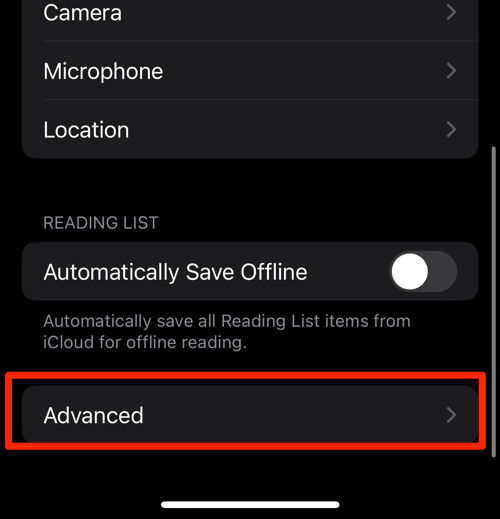
- Tap on the Website Data option.
It will display the list of all websites and corresponding data. - Tap on the command.
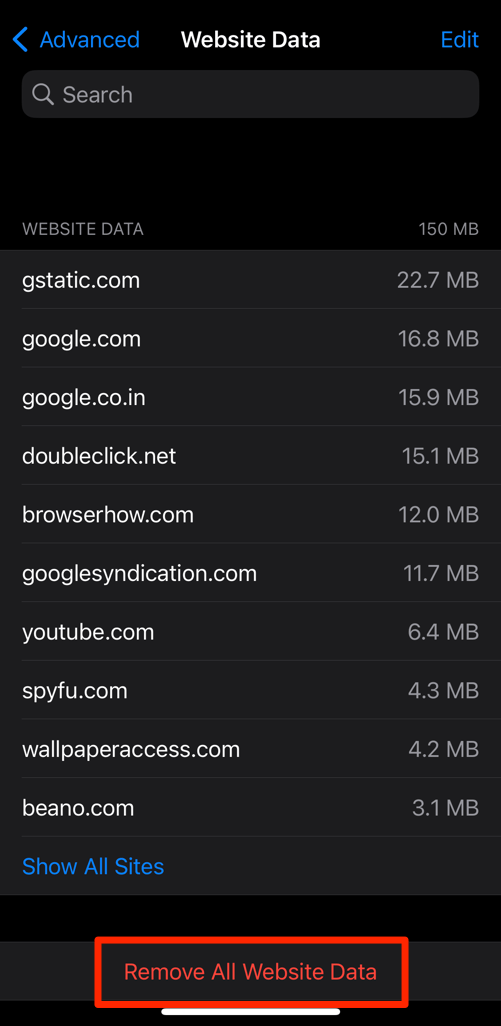 It will delete all the stored website data from the Safari browser.
Open Reddit again once Safari clears the data. A working feed and a working login mean the old website data was the problem.
Apple’s Safari privacy and website data support guide lists the current manual route as Settings → Apps → Safari → Advanced → Website Data.
If that screen comes up blank on a Mac, follow Fix Safari Manage Website Data Not Showing or Blank on Mac before trying another reset.
Rule Out Safari Extensions and Content Blockers
Ad blockers and privacy extensions remove page elements by design. Sometimes they remove too much.
- Launch the Apple Safari app on your Mac computer.
- Click on the Safari menu from the menu bar at the top, and select Settings... sub-menu.
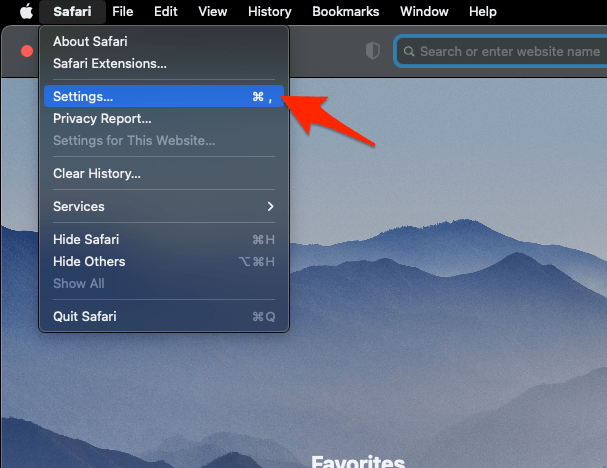 It will open the Safari Settings window.
- Switch to the Extensions tab in the Settings window.
It will display the list of all the Safari extensions installed. - Uncheck the checkbox in the left side pane to Disable the extension.
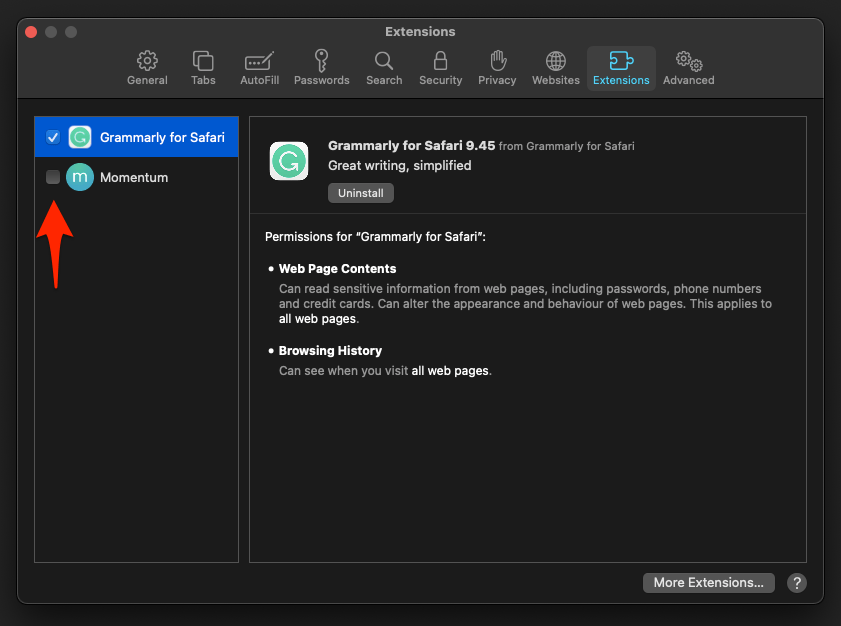
Reload Reddit with every extension off. You’ll know an extension is the culprit when the page works now and breaks again the moment you switch one back on. Re-enable them one at a time to find it.
On iPhone or iPad
- Open Settings.
- Select Apps.
- Select Safari.
- Select Extensions.
- Turn off one extension.
- Return to Safari.
- Reload Reddit.
If Reddit returns, leave the conflicting extension off for Reddit, or update it before switching it back on.
Update Safari
The fix may already sit in an update you have not installed. Safari ships with macOS, so its repairs arrive through system software.
- Click on the Apple
 menu from the menu bar and select the System Settings... sub-menu.
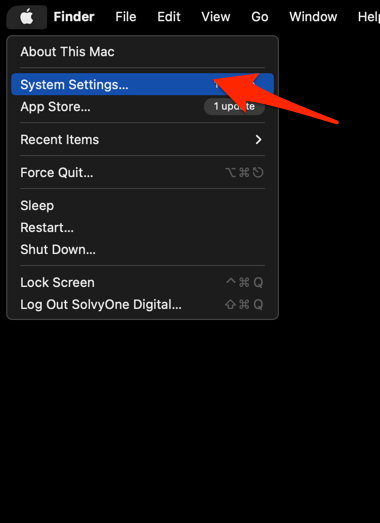 It will open the System Settings window.
- Select the General tab in the left sidebar, and choose the Software Update tab.
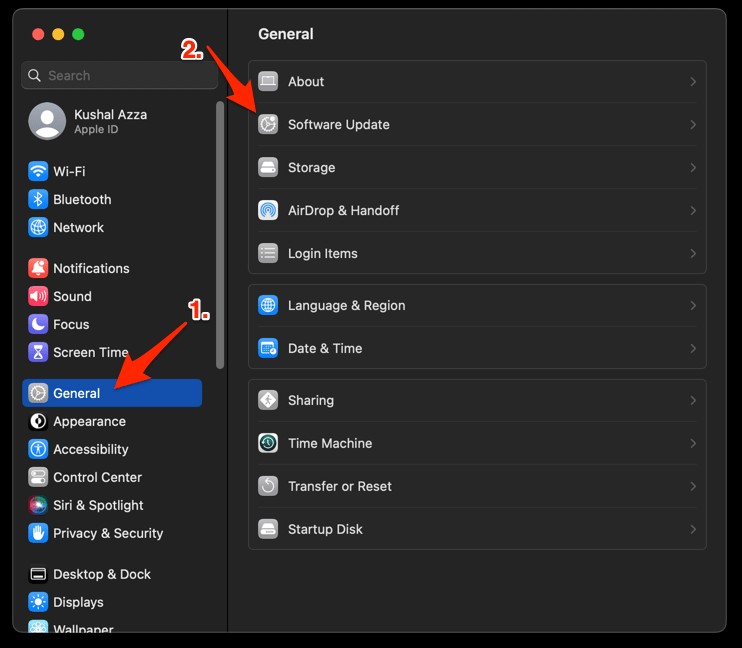 The macOS System will check for any available upgrades in the background.
- Click on the More Info... tab and enable the checkbox for Safari updates (if any are available).
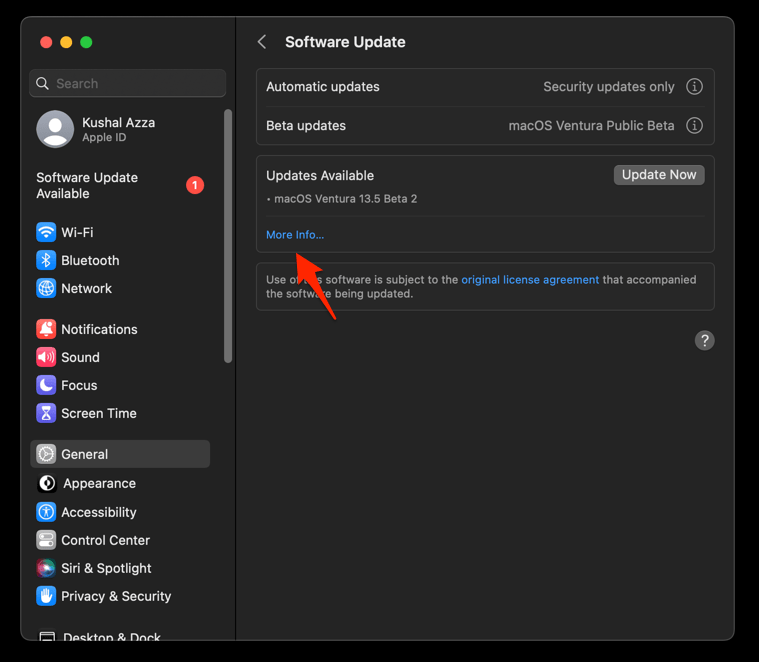
- Hit on the button.
It will update the Safari browser.
Restart Safari if the update asks, then open Reddit. A page that loads after updating tells you the installed software was the cause.
Update Safari on iPhone or iPad
Same story on iOS and iPadOS. Install the pending system update before you dig into network settings.
- Open Settings on your phone, and head on to the General section.
- Select Software Update to open the screen.
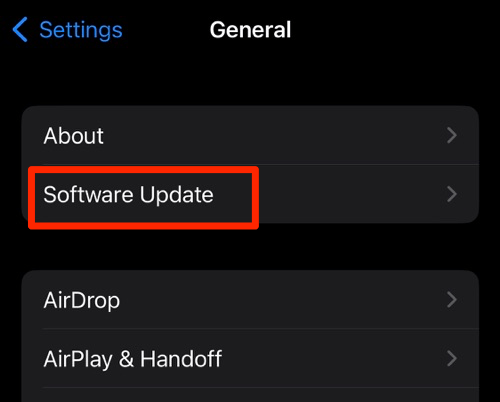 The device will automatically start looking for updates.
- Tap the button.
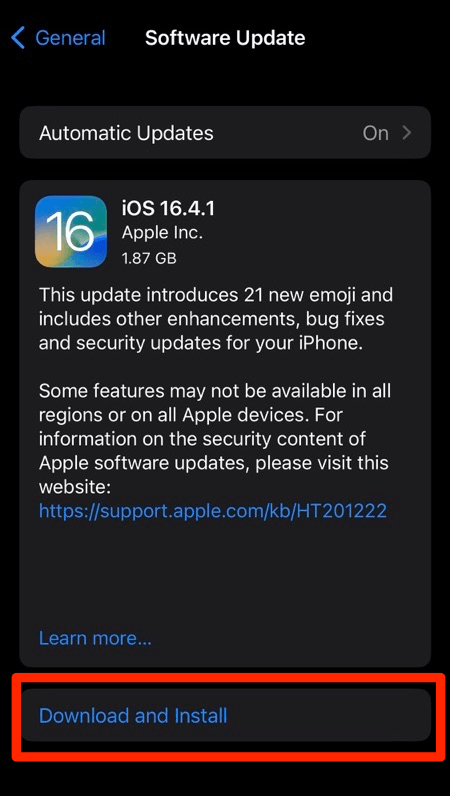 The update will download and install the latest Safari on your device, if available.
Reopen Safari and test Reddit once the update finishes. If the feed still fails, the network checks are next.
Check for Network, DNS, or VPN Filtering
When every other site loads and Reddit alone refuses, the block is often outside Safari: a VPN, a DNS filter, or a content filter on your network.
- Disconnect any VPN temporarily.
- Reload Reddit.
- Reconnect the VPN if it was not the cause.
- Try Reddit on a different network, such as a mobile hotspot.
- Return to the original network if Reddit works on the alternative network.
If only the original network fails, ask about its content filter or firewall rules. If Reddit fails on every permitted network and browser, wait and try again later or contact Reddit support.
Clear Safari’s DNS Cache on a Mac
A “cannot connect to server” message points at cached network lookups rather than cookies.
- Open the Apple Safari app on your Mac, and select Safari > Settings... from the menu bar.It will open the Safari Settings window.
- Switch to the Advanced tab, and enable the checkbox for the Show Develop menu in the menu bar option.
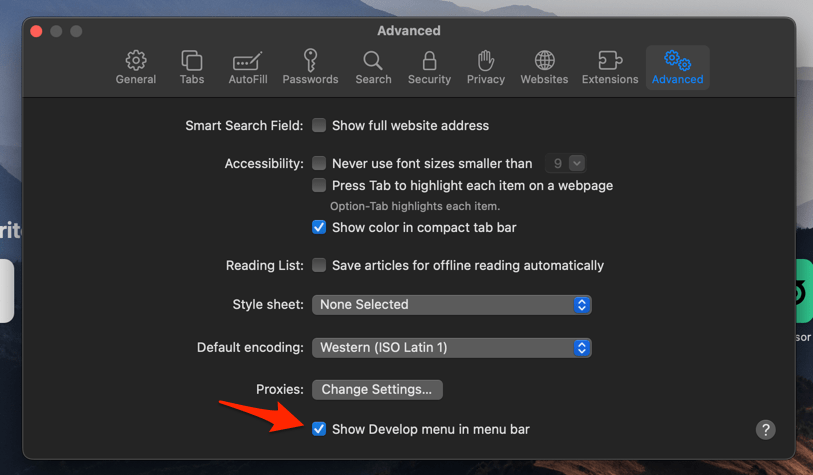 It will enable a new Develop menu in the Safari menu bar.
- Click on the Develop menu and select the Empty Caches command.
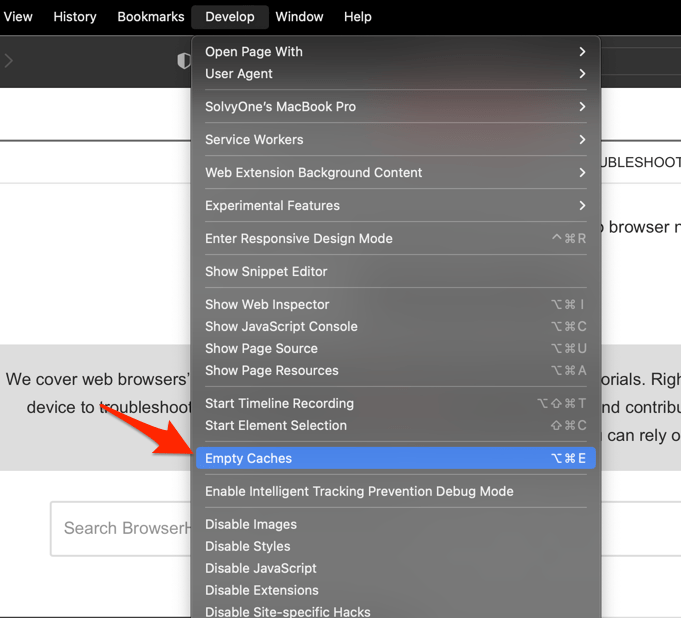 It will clear all cache, including the Safari DNS host cache.
Open Reddit again. If it loads, the cached lookup was stale. If it still fails, the restriction sits on the network side, or the service is unavailable where you are.
Confirm That Reddit Is Working Again
A loading home page is not proof. Check the parts you actually use before you call it fixed.
- Open Reddit in a normal Safari window.
- Scroll through the home feed.
- Open a post.
- Sign in if you were signed out.
If one feature fails, such as video, images, or login, go back to the matching permission setting. If the whole page fails, test another network and browser to see whether the problem is outside Safari.
Frequently Asked Questions
Why does Reddit work in Chrome but not in Safari?
Safari may be holding stale Reddit data, blocking cookies, applying stricter tracking protection, or running an extension that edits the page. Test Reddit in a Private Browsing window to see whether the problem is limited to your normal session.
Should I leave Prevent Cross-Site Tracking turned off?
Turn it off only long enough to test. If Reddit works with it off, restore it and use a permission exception for reddit.com instead of weakening the setting everywhere.
Does clearing Safari data delete my Reddit account?
No. You clear browser-stored cookies and site data, so you may need to sign in again. Your Reddit account and posts stay where they are.
Can I use Reddit in Safari Private Browsing?
Yes. If Reddit works there but fails in a normal window, clear the normal window’s website data and check Reddit’s website permissions and extensions.
What should I do if Reddit fails on every browser and network?
Safari is unlikely to be the cause. Reddit may be blocked on your network or unavailable in your region, so check permitted network access and try again later.