Microsoft Edge now supports accelerated app launches on Windows, and Microsoft says most Windows users will see launch times improve by 15%. The gain covers starting the browser, not loading websites.
The announcement names no specific version or release channel. Update Edge the usual way on Windows, close it completely, then reopen it and compare a clean launch with what you had before.
In this guide, I have covered:
Contents
Edge now launches faster on Windows
You open Edge dozens of times a day, and every extra second of startup adds up. Microsoft says Edge is the first browser to support accelerated app launches on Windows.
The company announced the change on October 29, 2026, according to the official Edge Dev announcement. Microsoft puts the gain at 15% for most Windows users.

The announcement does not name a specific Edge version or release channel. Check the build listed on Edge’s About page after you update.
What Edge accelerated app launches actually change
The 15% figure raises an obvious question: faster at what? Accelerated app launches change how Edge starts on Windows, so the gain covers the launch itself, not page loads, downloads, or tabs.
You’ll notice it when Edge reaches a usable window without pausing on a blank frame. Everything after that behaves the way it did before.
How to update Edge on Windows
You will not see the improvement until your copy of Edge includes the change. Update through Edge’s normal Windows update process:
- Launch Microsoft Edge on your computer system.
- Click on the More
 for the menu list, and select the Settings menu.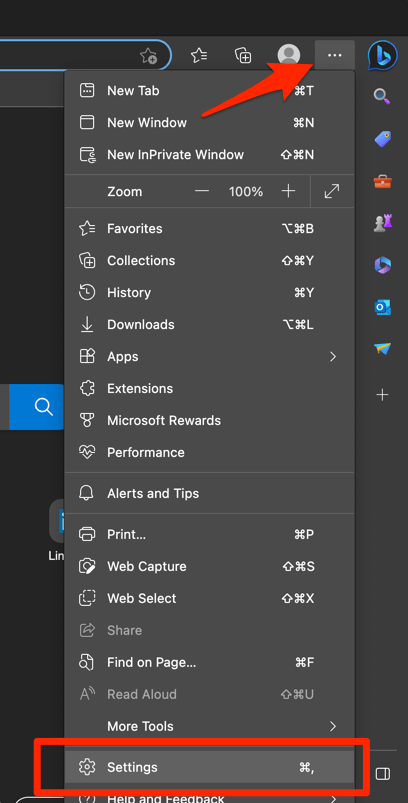
- Switch to the About Microsoft Edge tab from the left side pane.
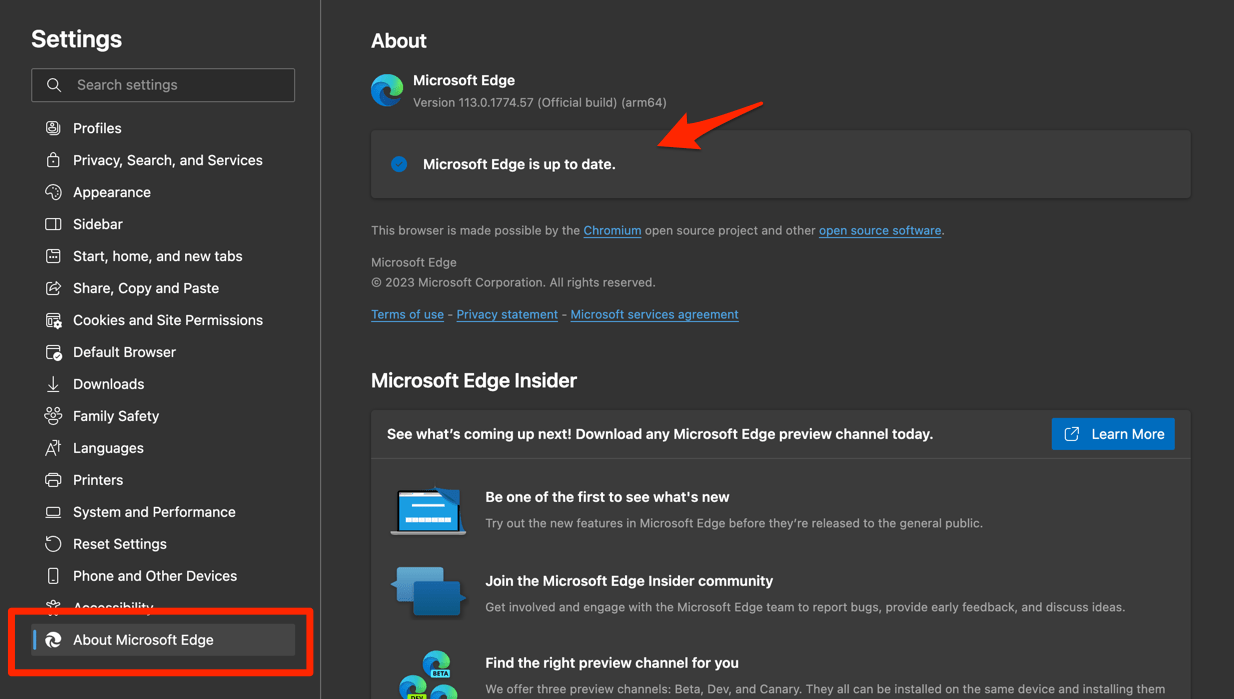 The Edge will automatically start checking for updates and installs, if any are available.
 - Finally, hit the button if available after the (major) update.
Edge browser will be updated to the latest version.
Close Edge completely when the update finishes, then reopen it. You’ll know it worked when the About page shows a newer build than the one you had before.
How to check the faster launch yourself
To judge the change on your own PC, test a cold launch.

TIP: Quit every Edge window first. A window that merely reappears from the background skips startup, so it cannot show you the improvement.
- Close every open Edge window.
- Open Edge from the taskbar or the Start menu.
- Watch how long the browser takes to reach a usable window.
Microsoft’s 15% figure is an expectation for most Windows users, not a guarantee for every launch. One startup may fall short of it.
Confirm the update installed before you judge the result, then compare a few launches instead of a single one.
Why you might not see the speedup
Updated Edge and still waiting on a slow first window? Start with the update itself. Confirm the new build installed, close every Edge window, and test again from scratch.
The announcement lists no minimum version number, no release channel, and no activation toggle, so there is nothing to switch on in settings. If the update never arrives, that is the thing to chase.
If the installation itself looks damaged, the BrowserHow guide to reinstall Microsoft Edge on Windows walks through a clean install.

Frequently Asked Questions
Short answers to the questions this change raises most often.
What is accelerated app launch in Microsoft Edge?
It is a Windows startup capability that Microsoft says makes Edge launch faster and more consistently. Microsoft describes Edge as the first browser to support accelerated app launches.
How much faster is Edge with accelerated app launches?
Microsoft says most Windows users will see launch times improve by 15%. The figure describes the time taken to launch the Edge app.
Which platforms support Edge accelerated app launches?
The announcement specifically covers Microsoft Edge on Windows. It does not state that the same launch improvement applies to Edge on other platforms.
How do I get the faster Edge launch on Windows?
Update Edge through its normal Windows update process, close it completely, and reopen it. The announcement does not list a separate version number or activation step.
Does this feature make web pages load 15% faster?
No. Microsoft describes a 15% improvement in Edge launch time, not a separate 15% guarantee for page loading, downloads, or tab performance.