Chrome 155 Stable is rolling out to Windows, Mac, and Linux. The desktop build is 155.0.8059.39 on Windows and Linux, and 155.0.8059.40 on Mac. It bundles security and stability fixes and will reach users over the coming days and weeks.
This guide covers what shipped in Chrome 155, how to check the version on your machine, and the quickest way to force the update manually on Windows, Mac, or Linux.
In this guide, I have covered:
Contents
Chrome 155 Stable Rolls Out to Windows, Mac, and Linux
Chrome 155 Stable is rolling out now to Windows, Mac, and Linux. The desktop build is 155.0.8059.39 on Windows and Linux, and 155.0.8059.40 on Mac. According to the Chrome Releases post, the rollout will reach users over the coming days and weeks.
What Shipped in Chrome 155
Chrome 155 is a security and stability update for the Stable channel. The fixes here close real vulnerabilities. Update sooner rather than later.
Google keeps bug details and changelog entries restricted until most users have installed the patched build. The same rule applies when a bug sits in a third-party library that other projects still need to fix.
The full changelog lives in the Chrome log linked from the announcement. Routine desktop Stable releases like this one pair smaller stability fixes with the security patches. The version bump from the previous 154.x line marks Chrome 155’s promotion to Stable.

Chrome Stable rollouts are phased. If you do not see the update right away, wait a few hours or a couple of days before retrying the update page. Your existing browser keeps running the previous version in the meantime.
How to Update Chrome on Your Computer
Chrome updates itself in the background most of the time. If you want the new build right now, you can force the update manually.
- Launch the Google Chrome on your computer.
- Click on More
 for the options list, and select the Settings menu.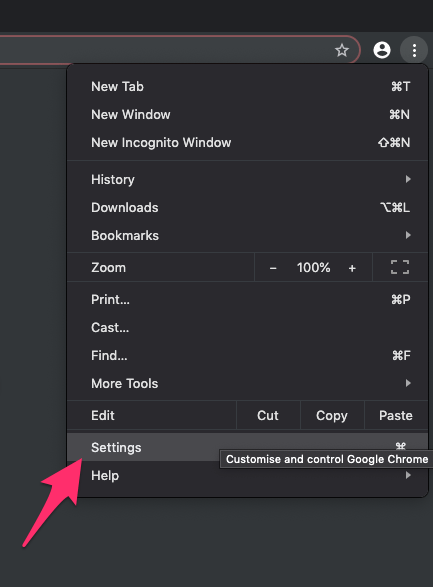
- Switch to the About Chrome tab in the left sidebar pane.
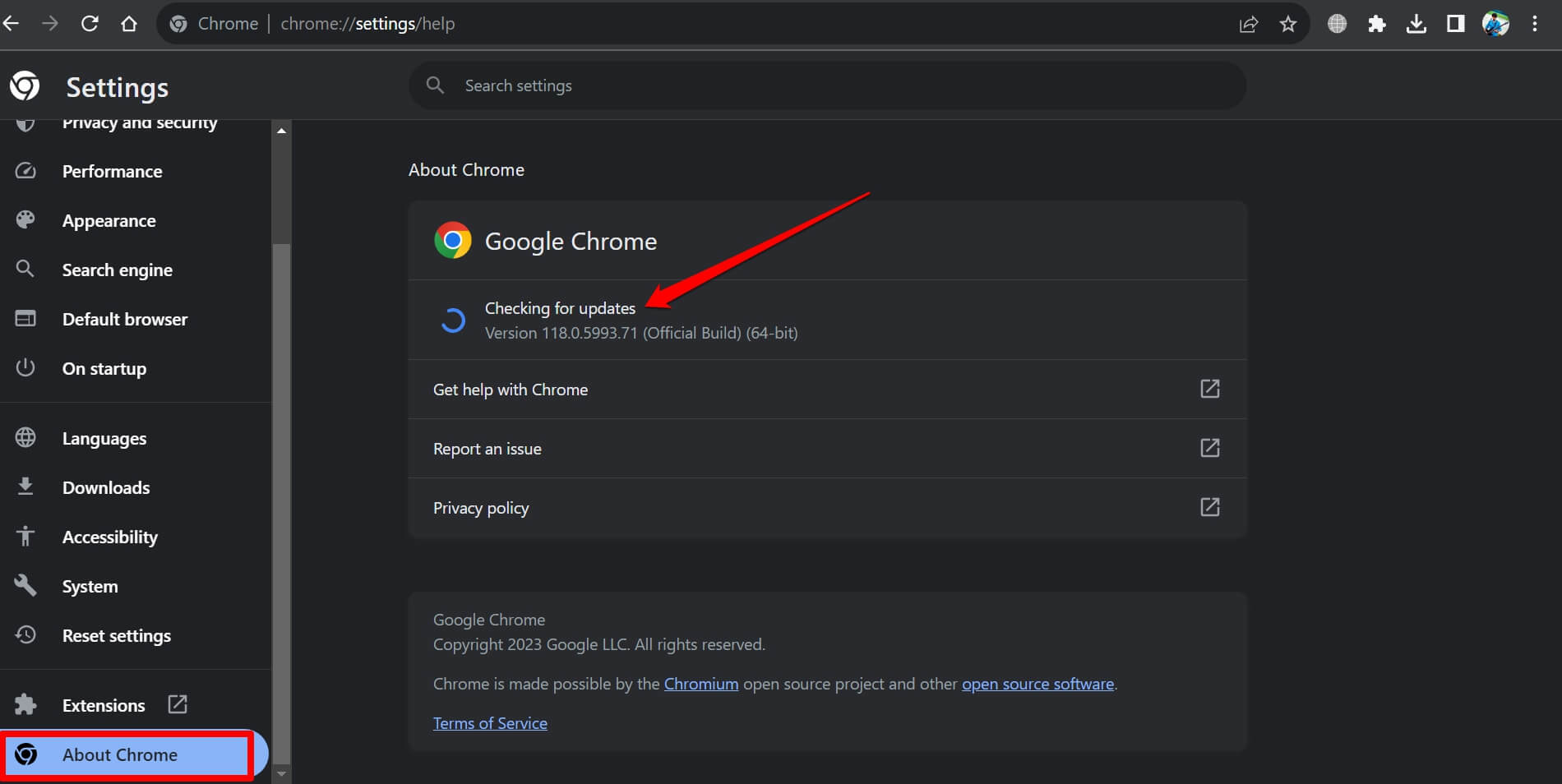 The browser should automatically start looking for the latest updates.
 - Hit on the button.
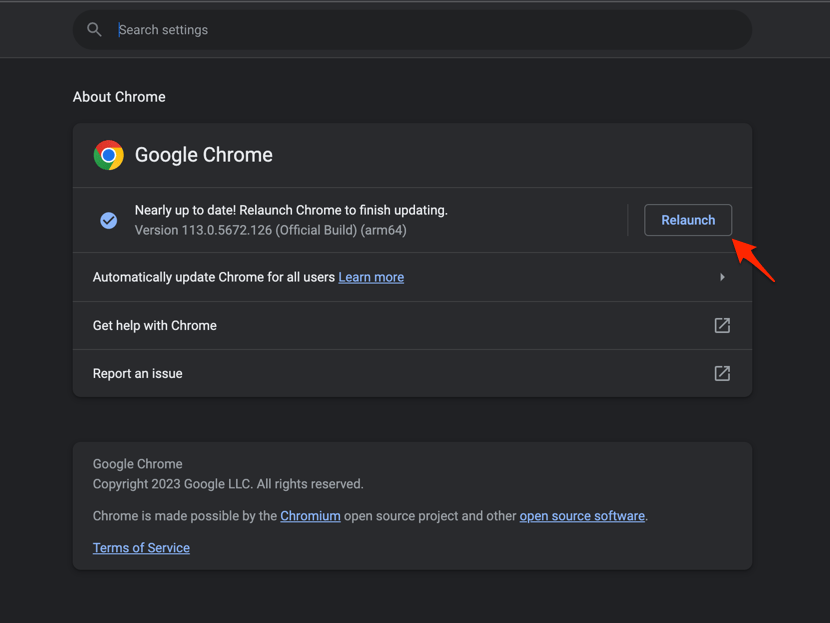 It will complete the Chrome browser update process.
After Chrome restarts, confirm the new version on the About Chrome page. You’ll know it worked when the build number shows 155.0.8059.39 on Windows or Linux, or 155.0.8059.40 on Mac.
If the build number still shows an older version, close the browser fully and try again later. A phased rollout is the most common reason a manual check returns nothing on the first try.
Verifying Your Chrome Version
Type chrome://version into the address bar and press Enter to confirm which Chrome build you are running. Use this after a manual update to confirm the new build actually installed.
The page lists the exact version string, the channel, and the underlying operating system. It is the fastest way to tell whether the 155 Stable build has landed on your machine yet.
After you confirm the update, check that your extensions still work. If an ad blocker breaks, our list of best Google Chrome ad blocker extensions can help you find a replacement.

Frequently Asked Questions
What is the latest Chrome Stable version?
The current Stable channel release for desktop is Chrome 155.0.8059.39 on Windows and Linux, and 155.0.8059.40 on Mac. The rollout is phased, so it can take a few days or weeks to reach every user.
How do I force Chrome to update on my computer?
Open the Chrome menu  , go to Help, then choose About Chrome. The browser will check for updates and download the latest Stable build automatically. A relaunch finishes the install.
Why does Chrome not show the 155 update yet?
Stable channel updates roll out gradually over days or weeks to catch regressions early. If About Chrome still shows an older build, wait a bit and check again.
After the update lands, confirm your extensions still work. If you rely on ad blockers, our list of best Google Chrome ad blocker extensions can help you find a replacement.
Are there security fixes in Chrome 155?
Yes. Google describes this release as a Stable channel security update and links to the Chrome log for the full changelog. Bug details may be kept restricted until a majority of users have installed the fix.
Is Chrome 155 available on Android and iPhone?
This announcement covers desktop (Windows, Mac, Linux) only. Android and iOS Chrome builds follow a separate release cadence and version numbering, so the desktop 155.0.8059.x build does not directly map to those platforms.
For Android-specific behavior, see how to view the full desktop site in Chrome on Android. You can also manage cookies in Chrome on Android if you’re troubleshooting site issues.