Chrome 158 is now rolling out to desktop computers running Windows, Mac, or Linux, and the build you see depends on your platform. Google pushes Stable releases in phases, so a slower arrival is normal rather than a sign that something broke.
Open a new tab and check chrome://version against the expected build, then run a manual update if your copy of Chrome is still on an older release.
In this guide, I have covered:
Contents
Chrome 158 Is Now in the Stable Channel
Chrome 158 just reached the Stable channel for desktop, so the question now is whether your computer already has it. Google promoted the release for Windows, Mac, and Linux on November 17, 2026.
The official Chrome Releases announcement says the release rolls out over the coming days and weeks. It is live now, even if your copy of Chrome still reports an older build.
Build numbers differ by platform. Linux gets 158.0.8127.36. Windows and Mac get either 158.0.8127.36 or 158.0.8127.37.

The Stable rollout is phased, so Chrome 158 may not reach every computer at the same time.
What Changed in Chrome 158
The announcement is light on specifics, which is normal for a stable desktop release. Chrome 158 contains a number of fixes and improvements, with the full list in the log linked from the post.
The same post also points readers to Google’s Security Fixes and Rewards information, which is where security-related changes for the release are tracked.
Google says upcoming Chrome and Chromium blog posts will cover the new features and bigger efforts delivered in 158. Those separate posts carry the detail for this release cycle.
How to Check Your Chrome Version
Before you reinstall anything, check which build you already have. It takes a few seconds.
- Open a new tab in Chrome.
- Type chrome://version in the address bar.
- Press .
- Read the Chrome version shown near the top of the page.
Linux should show 158.0.8127.36. Windows and Mac should show either 158.0.8127.36 or 158.0.8127.37. If your build matches, this rollout is already on your computer.
Update Chrome 158 on Windows, Mac, and Linux
If the version page shows an older build, you can push the update yourself instead of waiting for the phased rollout to reach you. Use the manual route below.
- Launch the Google Chrome on your computer.
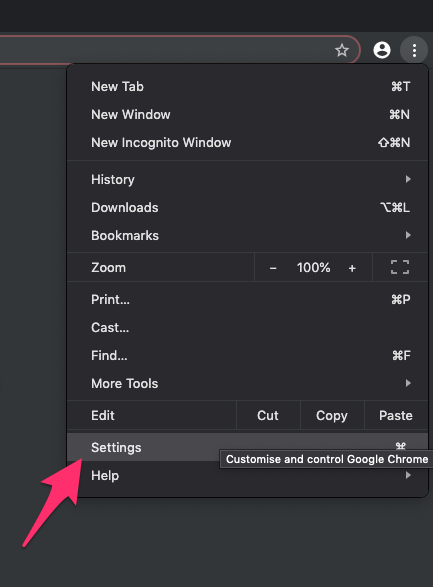
- Click on More
 for the options list, and select the Settings menu.
- Switch to the About Chrome tab in the left sidebar pane.
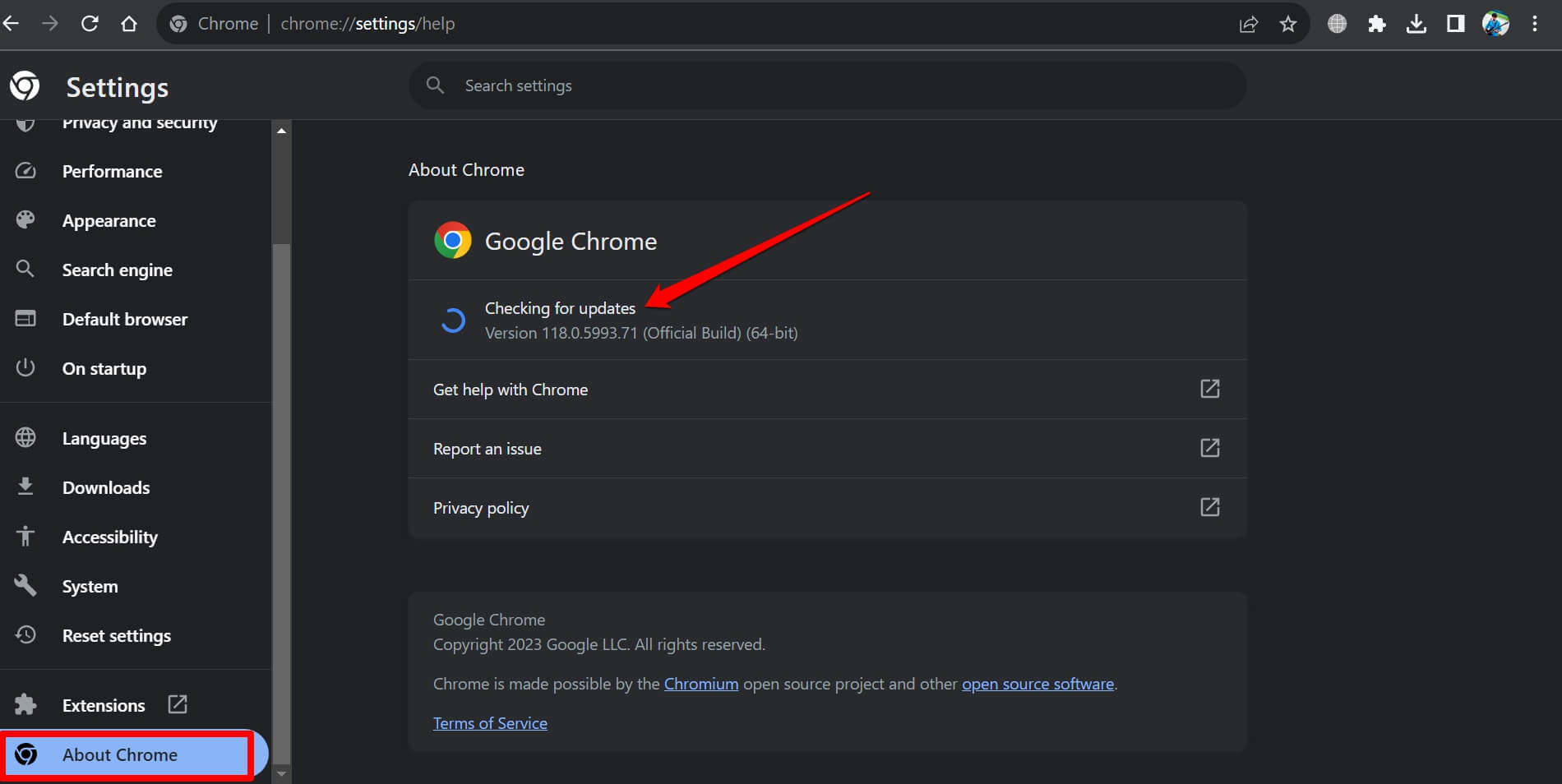 The browser should automatically start looking for the latest updates.
- Hit on the button.
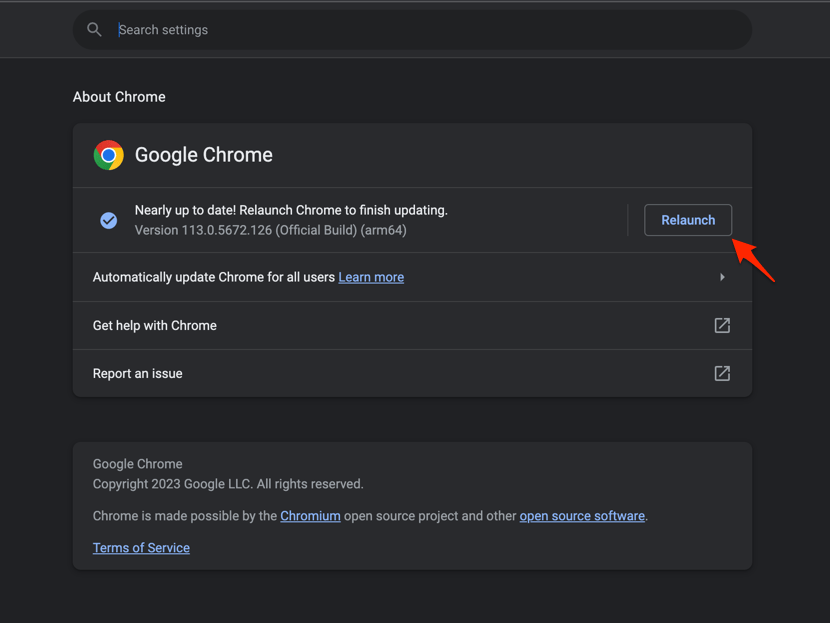 It will complete the Chrome browser update process.
You’ll know it worked when Chrome reopens and chrome://version shows 158.0.8127.36 on Linux, or one of the two listed builds on Windows and Mac. If no update appears, wait a day and check again. Rollouts move in batches.

TIP: If Chrome already shows one of the listed Chrome 158 builds, you do not need another installation for this rollout.
Back in the desktop browser, remember you have two layouts for any page: the full site and its mobile version. If a site looks off after the update, you can switch Chrome on your computer to the mobile version of that site and compare.

Frequently Asked Questions
Here are the answers to what readers ask most about Chrome 158.
Which desktop platforms received Chrome 158?
Chrome 158 was promoted to the Stable channel for Windows, Mac, and Linux. The rollout continues over the coming days and weeks.
What version number should Chrome show?
Linux should show 158.0.8127.36. Windows and Mac should show either 158.0.8127.36 or 158.0.8127.37.
Why have I not received Chrome 158 yet?
The release rolls out in phases, so it can take time to reach your computer. Check chrome://version again later if Chrome still shows an earlier build.
How do I update Chrome on Windows, Mac, or Linux?
Use Chrome’s desktop update process, then reopen the browser and check chrome://version. If no update is offered, wait for the phased rollout to reach your computer.
Either way, the build number tells you where you stand. Match it and you are current. If it does not match, run the manual update or check back tomorrow.