Setting Firefox as the default browser on Android means every link you tap in Gmail, Messages, or another app opens in Firefox automatically. The switch takes a few minutes from Android Settings or from inside the Firefox app.
You'll need Android 8 Oreo or later, because that is the minimum version supported by the current Firefox app. The steps below work on stock Android, Samsung Galaxy, and most other Android skins.
In this guide, I have covered:
Contents
Why Make Firefox Your Default Browser on Android
If you tap links in Gmail, Messages, or Slack and they open in Chrome or Samsung Internet, Firefox is not set as your Android default yet. Android picks one browser for every link from inside apps, and that browser stays the same until you change it.
Setting Firefox as the default makes those links open in Firefox instead. Your saved logins, bookmarks, and privacy controls then follow you on every new page. You can switch from Android Settings or from the Firefox app itself.
Before You Start
If you haven’t installed Firefox yet, do that before changing any defaults. Firefox for Android currently requires Android 8 Oreo or later. On Android 7 or below, Google Play won’t offer the current version.
Use the Firefox download and update guide to get the latest version, then come back to set it as the default.

On company or school phones enrolled in Android Enterprise (for example, an Intune-managed device), the default browser setting may be locked by your organization’s policy. If the Browser app entry is grayed out, ask your IT admin to whitelist Firefox.
Set Firefox as Default from Android Settings
Start here if you want Android’s official route. It uses the built-in default-app picker and matches the steps in Mozilla’s make Firefox the default browser on Android support article.
- Open the Settings app on the Android Phone.
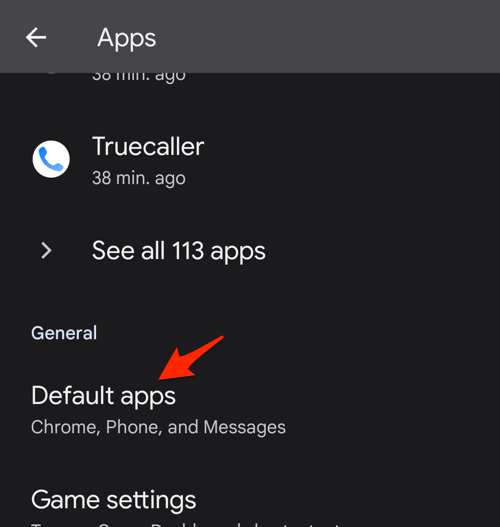
- Select the Apps settings and scroll down to the Default apps section.
- Choose the Browser app option within the Default apps settings screen.
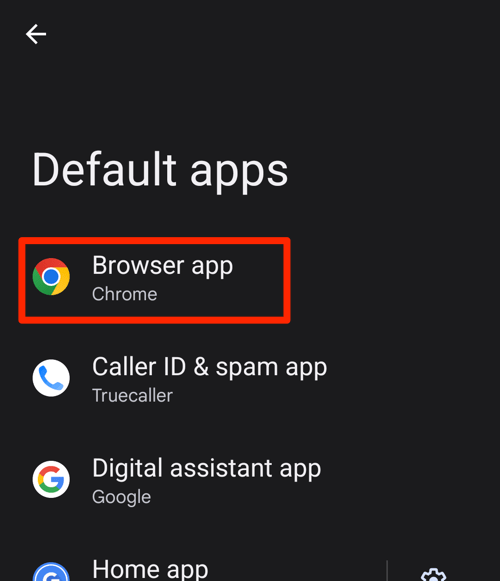 It will display the list of available web browser apps on your device.
 - Choose the new Default browser for Android from available apps.
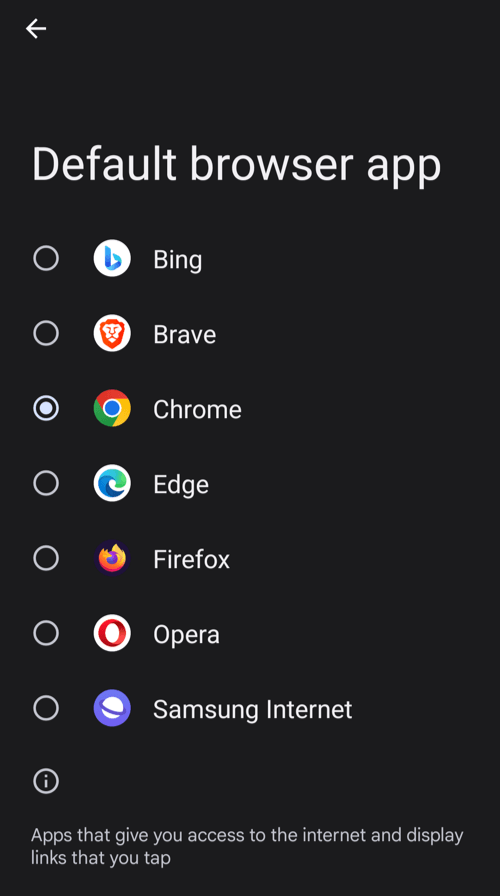 The newly selected browser will be set as the default browser on your Android smartphone.
On Samsung Galaxy phones, the menu may be labeled Apps or Applications instead of Apps & notifications. The picker shows Samsung Internet next to Firefox. Pick Firefox and confirm.
You’ll know it worked when the Browser app entry shows Firefox and links from non-browser apps open there.
Set Firefox as Default from Inside Firefox
Already browsing in Firefox? The app can jump you to the right system screen in one tap.
- Open Firefox on your Android device.
- Tap the three-dot menu
 at the top right.
 - Tap .
- Tap .
- If Android shows a confirmation dialog, choose Firefox and confirm.
When Firefox is already your default, the entry changes to Firefox is your default browser and there is nothing more to do.

TIP: On older Android 8 and 9 devices, the Firefox Settings layout is slightly different, but the menu, , and entry are still there.
What to Do If Firefox Does Not Appear in the Browser Picker
If Firefox is installed but missing from the browser picker, the issue is usually a hidden app list or an older Firefox build. Work through these checks in order.
- Open the Google Play Store and search for Firefox. If the button says , Firefox is already installed.
- Update Firefox if the Play Store shows . Outdated installs can be hidden by the picker.
- Open Settings > Apps > Firefox > Battery and set the optimization to Unrestricted or No restrictions on Samsung, Xiaomi, Oppo, or OnePlus phones. Aggressive battery saving can hide Firefox from the default-app list.
- Reboot the phone. After a restart, Android rebuilds the default-app list and Firefox usually reappears.
- Reinstall Firefox as a last resort. Uninstall it, install Firefox Fast & Private Browser from the Play Store, and try again.
Confirm Firefox Is Now Your Default Browser
The fastest way to check is to open a link from any non-browser app.
- Open Gmail, Messages, or Slack.
- Tap any web link inside a conversation.
- Confirm that the link opens in Firefox rather than your old default.
You can double-check in system settings. Go to Settings > Apps > Default apps > Browser app and look for Firefox as the current choice.
Once Firefox is the default, set up cookie settings in Firefox for Android or learn how to open private tabs in Firefox on Android.

Frequently Asked Questions
Why are links still opening in Chrome after I changed the default?
A few apps ignore the system default and open links in their own in-app browser. Facebook is the most common example. Long-press the link and pick , or turn off in-app link opening inside that app’s settings.
Will setting Firefox as the default erase my Chrome data?
No. Chrome and Firefox store their data independently. Changing the default only redirects new link opens. Bookmarks, history, and saved logins stay in both browsers until you sign into each one separately.
Can I set Firefox as the default on a work or school phone?
Often no. Devices enrolled in Android Enterprise or managed by Microsoft Intune usually lock the default browser to one app, and the Browser app entry is grayed out. Ask your IT administrator to whitelist Firefox through policy.
Does Firefox work as the default on Samsung Galaxy phones?
Yes. Galaxy phones ship with Samsung Internet as the default, but you can replace it with Firefox through Settings > Apps > Default apps > Browser app. The picker will list both browsers once Firefox is installed.
What is the minimum Android version for setting a default browser?
Android has supported default app pickers for the browser role since Android 6 Marshmallow. The current Firefox app needs Android 8 Oreo or later, so on Android 7 or below the steps above won’t work with the current version.