Firefox keeps closing on your iPhone, sometimes on the same page every time and sometimes at random. That points to an outdated app, a full device, or bad site data rather than a broken phone.
Start with the App Store update, force-quit the app, then clear cache and site data. Reinstall Firefox if the crashes survive all three, and check the version afterwards.
In this guide, I have covered:
Contents
Why Firefox keeps closing on your iPhone or iPad
Firefox vanishes mid-page, you tap the icon again, and the app drops you straight back to the home screen. Most of the time it comes down to one of four things: an outdated app, a nearly full device, corrupted site data, or an iOS version Firefox no longer supports.
Work through the fixes in the order below and stop as soon as Firefox behaves. Mozilla’s Firefox for iOS support page lists the current release and support details if you want to check your version first.
Update Firefox and check your iOS version
A crash Mozilla already fixed will keep returning until you install the newer release. That’s why the update comes first.
- Open the App Store on your iPhone.
- Tap on your Profile icon in the top right corner.
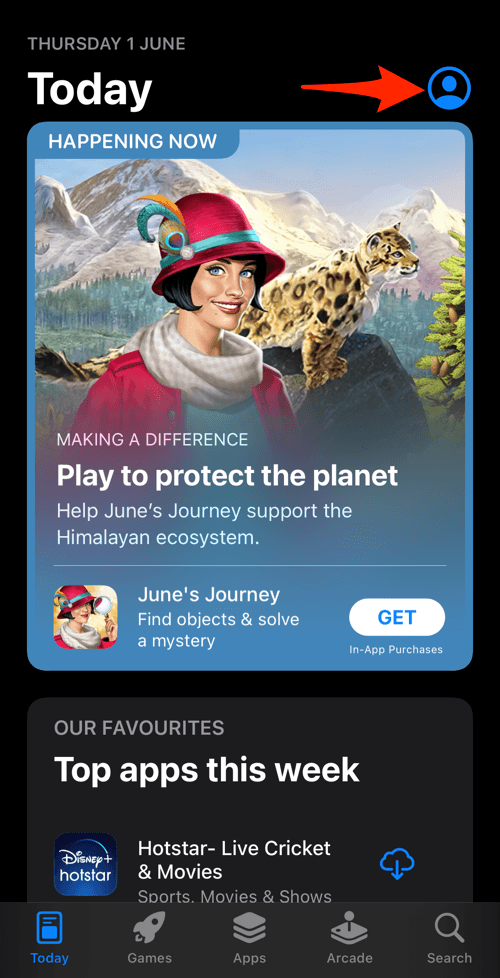
- Scroll down to the Available Updates section.
- If an update for Firefox is available, tap on next to it.
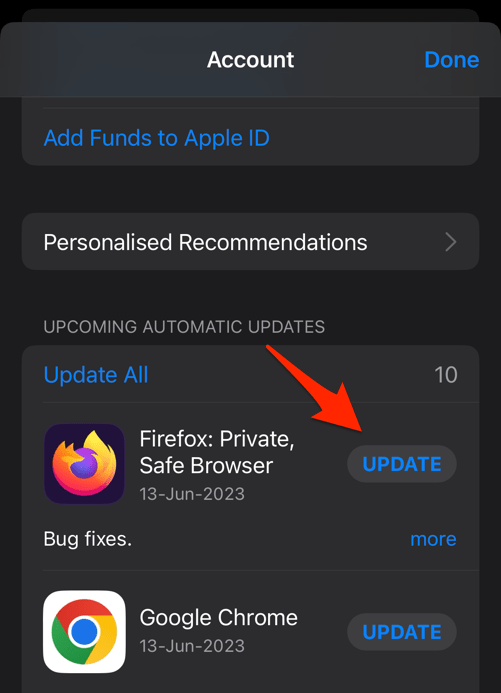 The browser will complete the update in the background.
Then reopen Firefox and repeat whatever broke it before: the page, the download, the video. If the app stays open, you’re done. If it closes again, keep going.
Restart Firefox and free up iPhone storage
Firefox still closing after the update? Force it out of memory and check how much space is left on the phone. Both checks take about a minute.
- Open the App Store and search for Firefox.
- Tap Update if an update is available, or Open if the app is already current.
- Swipe up from the bottom of the screen and pause on the Firefox app card.
- Swipe the Firefox app card away to close it.
- Open Settings and check the available storage for your iPhone.
- Remove large files or unused apps if storage is low.
- Open Firefox again and test the action that caused the crash.
If Firefox stays open after the restart, keep the update installed and use the app as usual. If the crash comes back, the cause is more likely data than memory, so move to the next section.
Clear Firefox cache and site data
Cache and site data can go stale and take the app down with them when a page loads. Clearing them is the next thing to try.
Expect a few sign-outs. Cookies and locally stored browsing data go along with the cache, while your Mozilla account and synced data stay untouched.
- Launch the Firefox app on your iPhone.
- Tap on the More
 menu and select the Settings option menu.

- Scroll down and open the Data Management option under the Privacy section.

- Enable the toggle button for the Cookies and Cache option

- Hit on the command.
It will clear the stored data from the browser app.
Reopen Firefox and load the page that crashed. You’ll know it worked when that page survives the scroll, tap, or download that used to kill the app.
If the same page dies in Firefox on your computer, you can clear the Firefox cookies and cache there too. If the iPhone app still closes, move on.
Test whether a particular site causes the crash
Firefox feels fine on some pages and dies on one? Then the site is your suspect, and this test takes about two minutes.
- Open Firefox and enter a simple web address in the address bar.
- Wait for the page to finish loading.
- Navigate back to the site that caused the crash.
- Repeat the action that made Firefox close, such as scrolling, playing media, or starting a download.
If only that site crashes, clear its data instead of wiping all of Firefox. The steps to delete site data without deleting cookies in Firefox cover exactly that.

TIP: Clearing one site’s data leaves every other login intact. Save the full cache wipe for crashes that follow you across several pages.
Reinstall Firefox on your iPhone or iPad
When updates, restarts, and data cleanup all fail, a clean reinstall is the last repair worth trying at app level. It removes the app and its local data from your device, though not your Mozilla account or synced Firefox data.
- Open Settings and select Apps.
- Select Firefox, then tap Delete App and confirm the deletion.
- Open the App Store and search for Firefox.
- Tap Get or the app’s update button to install Firefox.
- Open Firefox and sign in to your Mozilla account if you use Sync.
- Test the action that caused the previous crash.

Do not reset the entire iPhone or erase all device content unless Mozilla or Apple support specifically directs you to do so. A Firefox reinstall is less disruptive and is usually the appropriate final step for an app-only crash.
If Firefox still crashes after a clean reinstall, the issue sits outside the app: the iPhone’s software, its storage, or one account and site combination. Record the Firefox version from Settings > About Firefox, plus your iPhone model and iOS version, and send it all to Mozilla support.

Check the Firefox version after the repair
Before you call it fixed, confirm which build you’re actually running. A supported release rules out the simplest explanation.
- Open Firefox and tap the menu.
- Select Settings.
- Scroll to About Firefox.
- Compare the displayed version with the latest release listed by Mozilla.
Firefox for iOS needs a supported version of iOS. If your iPhone cannot run a supported release, update the device software or use another browser until it can.
Frequently Asked Questions
Why does Firefox keep closing on my iPhone?
An outdated Firefox release, low device storage, corrupted browsing data, or one specific website can trigger unexpected closes. Test them in order, starting with an update and a full app restart.
Will clearing Firefox data delete my passwords?
Clearing cache and site data removes cookies and site-specific information, so some websites may sign you out. Your Mozilla account and synced data are stored separately from the app’s local browsing data, but confirm your sync status after reinstalling Firefox.
How do I reinstall Firefox without losing my bookmarks?
Bookmarks saved to your Mozilla account come back when you sign in to Firefox Sync after reinstalling. Before deleting Firefox, make sure Sync is enabled and has finished on your account.
Can one website cause Firefox to crash on iPhone?
Yes. If Firefox stays stable on other pages but closes whenever you open a particular website, clear that site’s data and request the desktop version of the page. If the crash continues, reinstall Firefox.
What should I do if Firefox crashes immediately after reinstalling?
Check that your iPhone runs a supported iOS version and has enough free storage. If both are fine, report the crash to Mozilla with the Firefox version, iPhone model, iOS version, and the website or action involved.