Opera 140.0.6074.36 has landed on the stable desktop channel and moves the browser to Chromium 157.0.8103.79. Opera describes it as the latest upstream improvements from the Chromium project, with the full list in the changelog.
Your copy may not have it yet. Compare the version shown under About Opera, then run Update & Recovery from the Opera menu to install the build by hand.
In this guide, I have covered:
Contents
What the Opera 140.0.6074.36 Release Includes
You want to know whether your copy of Opera is current, and what the new build actually contains. Here is the short version: according to the official Opera announcement, version 140.0.6074.36 is out on the stable desktop channel and moves the browser to Chromium 157.0.8103.79.
That Chromium jump is the substance of the release. Opera says it gives users the latest upstream improvements from the Chromium project, and points to the changelog for the full list.
Which Platforms Get This Update
You’re reading this on a Windows PC or a Mac and wondering whether the build covers you. It does. The announcement covers Opera Desktop installations, and it does not identify a separate Android or iPhone release.
If Opera isn’t installed on the machine yet, the first download and the update path that follows it are covered in download the Opera browser and update it to the latest version.
Rollout and Availability
Opera calls 140.0.6074.36 a stable release, so it will arrive on its own at some point. The announcement gives no staged rollout schedule, which means there is no date to circle for your particular installation.
To see whether the update has reached your computer, open the Opera menu and check Update & Recovery.

If 140.0.6074.36 is not listed, Opera has not stated when the release will reach that installation. Your current build is simply still the newest one available to you.
How to Update Opera on Computer
If the update hasn’t landed on its own, you can pull it yourself in a couple of clicks. Open the Opera menu and choose Update & Recovery.
- Open the Opera browser on your computer.
- Click on the Opera menu on macOS or the Opera icon on Windows, and select Update & Recovery from the drop-down menu.
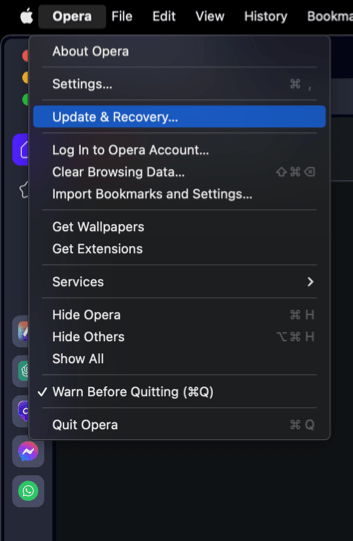 In the Address bar, you can also visit opera://update. It will open the update and recovery page.
- Opera will automatically check for updates. If any are available, they will be downloaded and installed.
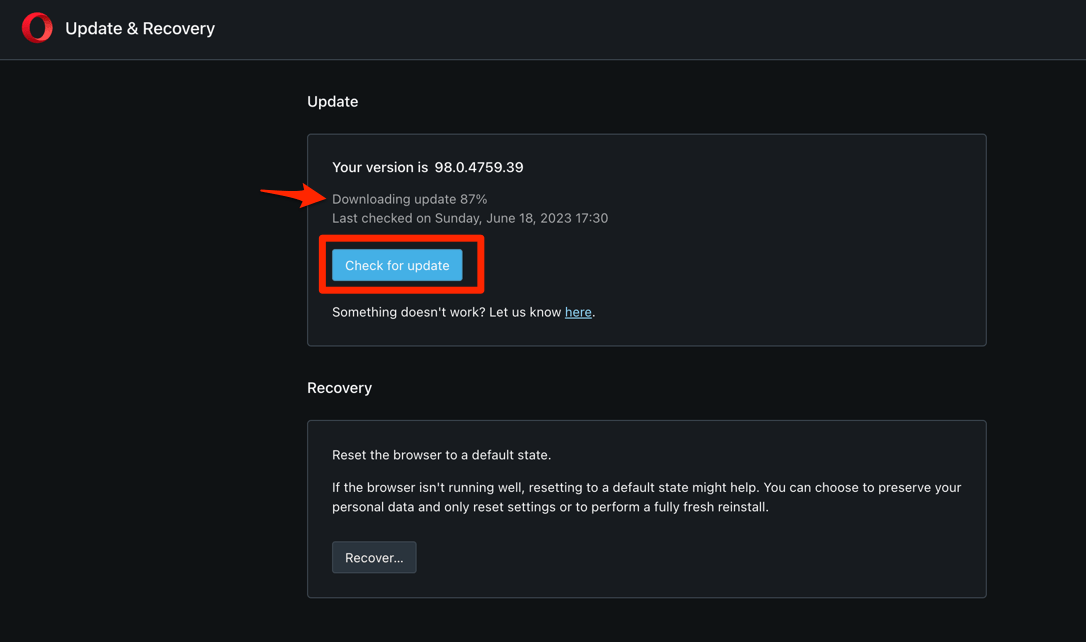
- After downloading, the browser might also ask to hit on to complete the update process.
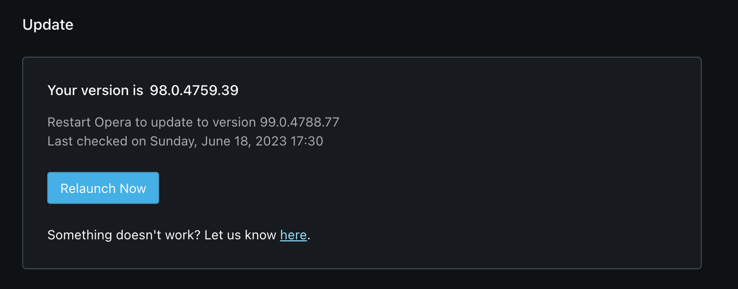 The browser will complete the update.
Opera checks for the new build and installs it. Update & Recovery is the manual route Opera names in the announcement, so there is no separate installer to hunt down.
You’ll know it worked when the version shown on that page reads 140.0.6074.36. If it still shows an older build, the release hasn’t reached your machine yet and there is nothing broken to fix.
How to Check the Installed Opera Version
Not sure whether the update actually took? The About Opera page shows the exact build your browser is running.
- Open the Opera menu.
- Select About Opera.
Compare the displayed version with 140.0.6074.36. A lower number means the stable release has not been installed yet, so repeat the manual check later or wait for the rollout to reach you.

Frequently Asked Questions
What is the latest stable Opera desktop version?
Opera 140.0.6074.36 is the stable desktop release announced on November 18, 2026. It updates the Chromium base to 157.0.8103.79.
Which devices are covered by the Opera 140 release?
The announcement covers Opera Desktop installations. It does not identify a separate Android or iPhone release.
What changes does Opera 140 include?
Opera says the update brings the latest upstream improvements from Chromium 157.0.8103.79. The full list is available in the changelog referenced by the release announcement.
Is Opera 140 rolling out gradually?
The announcement does not state a staged rollout timetable or a wider availability date. If the manual update page does not yet list 140.0.6074.36, check it again later.
How can I confirm that the update is installed?
The About Opera page displays the installed version. It should show 140.0.6074.36 after the update. If it does, you’re on the newest stable build and there’s nothing else to do.