Opera has rolled out Stable update 136.0.6008.52 with a new VPN feature that connects automatically when you join a public Wi-Fi network. The release is also built on Chromium 152.0.7977.130, pulling in the latest upstream security fixes.
This BrowserHow guide covers what is new in the update, how to check your current Opera version, and how to update the browser manually on your computer. The rollout is phased, so some users may need to wait a few days before the update arrives.
In this guide, I have covered:
Contents
What’s New in Opera 136.0.6008.52 Stable
Opera has released Stable update 136.0.6008.52 for desktop, and the headline feature is a smart upgrade to the browser’s free built-in VPN. According to the official Opera blog announcement, the VPN can now connect automatically the moment you join a public Wi-Fi network.
Public hotspots at cafes, airports, and hotels are common targets for snooping. An always-on connection in those situations closes a real gap for users who keep the VPN disabled by default. The feature builds on the existing free VPN, so no separate subscription or extension is required, which lines up with how Opera tends to ship tools in place of third-party Opera browser add-ons and extensions.
The release is also built on Chromium 152.0.7977.130, which pulls in the latest upstream security and stability fixes from the open-source project.
How to Update Opera on Your Computer
If the automatic update has not reached your PC or Mac yet, open the Opera menu, head to Update & Recovery, or visit opera://settings/help in the address bar. You can also follow the manual steps below.
- Open the Opera browser on your computer.
- Click on the Opera menu on macOS or the Opera icon on Windows, and select Update & Recovery from the drop-down menu.
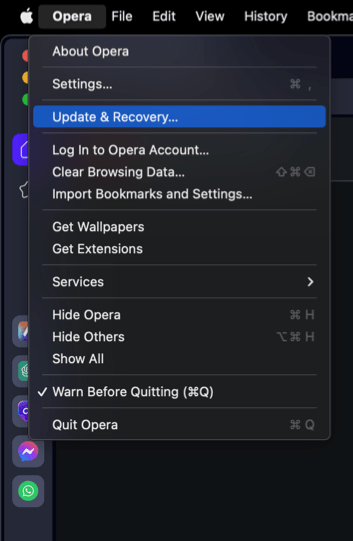 In the Address bar, you can also visit opera://update. It will open the update and recovery page.
 - Opera will automatically check for updates. If any are available, they will be downloaded and installed.
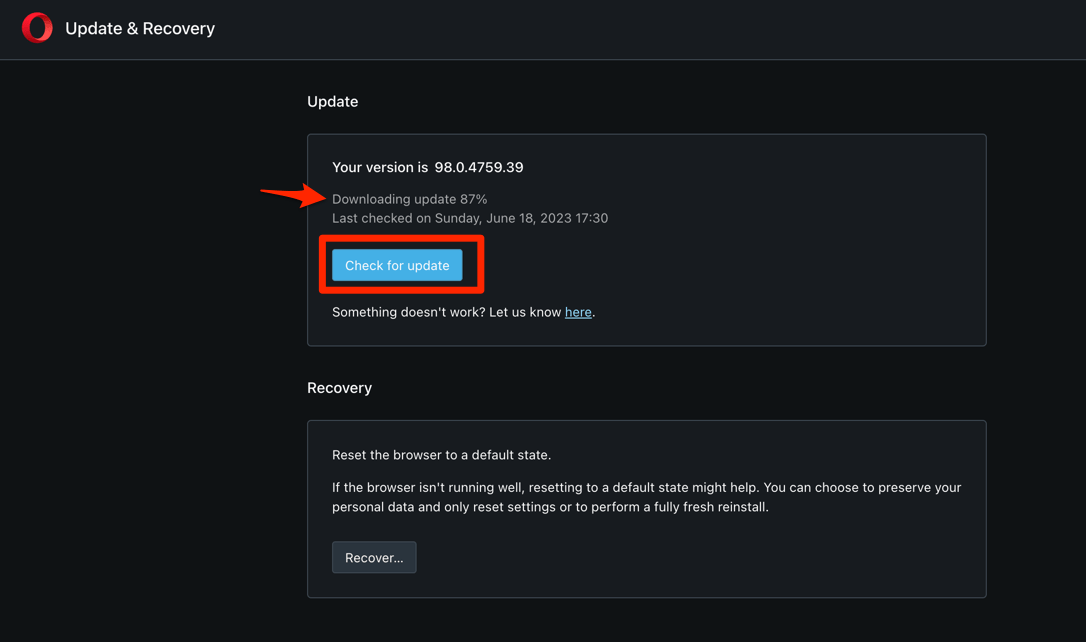
- After downloading, the browser might also ask to hit on to complete the update process.
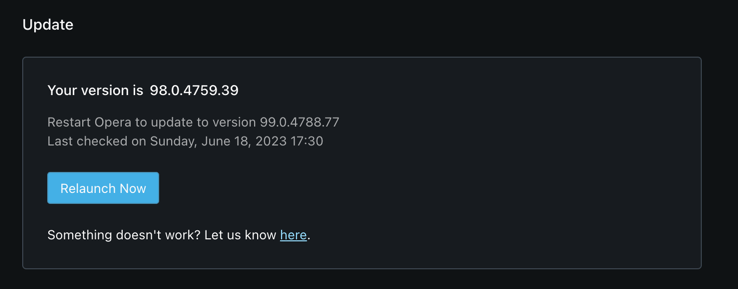 The browser will complete the update.
Relaunch Opera when prompted and confirm the new build number on the settings page. You’ll know it worked when the About page shows 136.0.6008.52 instead of your previous version. If you would like a fresh install on a new machine instead, see our guide to download the Opera browser and update it to the latest version.

Opera pushes Stable updates in phases, so it can take anywhere from a few hours to several days for 136.0.6008.52 to reach every install. If the new build is not offered after a couple of days, restart Opera or use the Update & Recovery page to force a check.
What the Chromium 152 Base Means
Because Opera is built on top of Chromium, every Stable bump inherits the upstream fixes Google ships in Chrome. Opera 136.0.6008.52 is based on Chromium 152.0.7977.130, so desktop users automatically pick up the same security and stability work that landed in Chrome 152.
If you also use other Chromium browsers on the same machine, expect Chrome, Edge, Brave, and Vivaldi to receive comparable Chromium 152 updates on roughly the same schedule.

TIP: Keeping Opera on the latest Stable build is the easiest way to stay current with Chromium security fixes. If you prefer a clean slate, you can always reset Opera settings and data on your computer after updating.

How the New VPN Auto-Connect Behaves
The new setting targets the moment your device joins a network Opera recognizes as open or untrusted, like a hotel or coffee-shop hotspot that does not require a password. Instead of waiting for you to remember to switch the VPN on, Opera raises the VPN shield on its own so that traffic from that point onward is tunneled.
You can still turn the VPN off manually at any time, and Opera’s existing region selection and bypass rules continue to apply. If you manage site-specific cookie or cache behavior, this change does not touch those settings.
Frequently Asked Questions
What is new in Opera 136.0.6008.52?
The biggest user-facing change is VPN auto-connect on public Wi-Fi, so the built-in VPN activates itself when you join an untrusted hotspot. The release also includes the latest Chromium 152.0.7977.130 security and stability fixes.
Do I need to enable the public Wi-Fi auto-connect manually?
Yes. Opera exposes the auto-connect behavior as a setting inside its VPN panel, so you will still need to switch it on once after updating. Your existing VPN preferences stay intact.
Why does Opera’s About page still show my old version?
Stable rollouts are phased, and the update can take anywhere from a few hours to several days to reach every install. If the new build is not offered after a couple of days, restart Opera or use the Update & Recovery page to force a check.
Is Opera’s VPN still free with this update?
Yes. The new public Wi-Fi auto-connect is part of the existing free, built-in VPN. No paid plan or extension is required to use it.