Microsoft Edge is giving its new tab page a stronger discovery focus, so the first thing you see is meant to help you find content worth your time rather than wait for a search.
The announcement names no version number or rollout date. Update Edge, open a fresh tab, and compare it with the official post to see whether the change has reached your device.
In this guide, I have covered:
Contents
What the Microsoft Edge new tab change means for you
Microsoft Edge is rebuilding its new tab around discovery, according to the official Edge Dev announcement. The promise is simple: the page you land on when you open a tab should help you find something worth your time, not sit there waiting for a search.
No version number. No rollout calendar. Microsoft frames this as a change to the new tab experience itself, so you check it by looking at the page, not at a build number.
Why Edge is leaning harder on discovery
A new tab does two jobs at once. It starts the task you already had in mind, and it offers a moment where something unexpected could catch your eye. Microsoft thinks the second job has been underused.
The stated reason is user feedback. As the volume of content online has grown, Edge users asked for more help cutting through it, and discovery moved to the center of the page as a result.
That makes the new tab a recommendation surface as much as a launchpad. Whether that feels useful or noisy is a matter of taste, and the page still opens fast either way.
How to update and check Edge on a computer
You want to see the change on your own machine, not just read about it. Get Edge current first.
- Launch Microsoft Edge on your computer system.
- Click on the More
 for the menu list, and select the Settings menu.
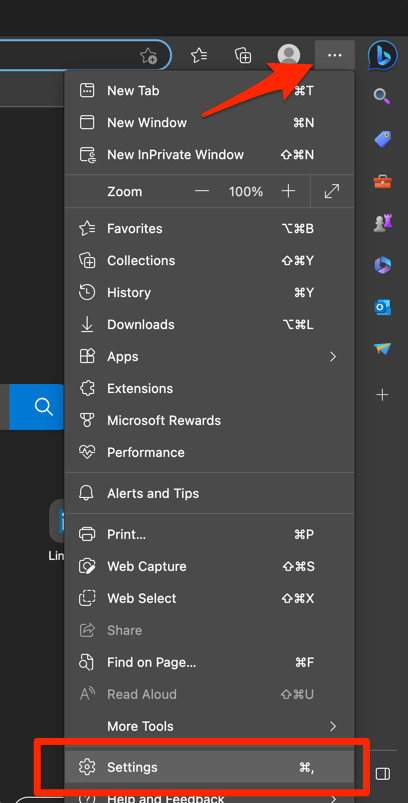
- Switch to the About Microsoft Edge tab from the left side pane.
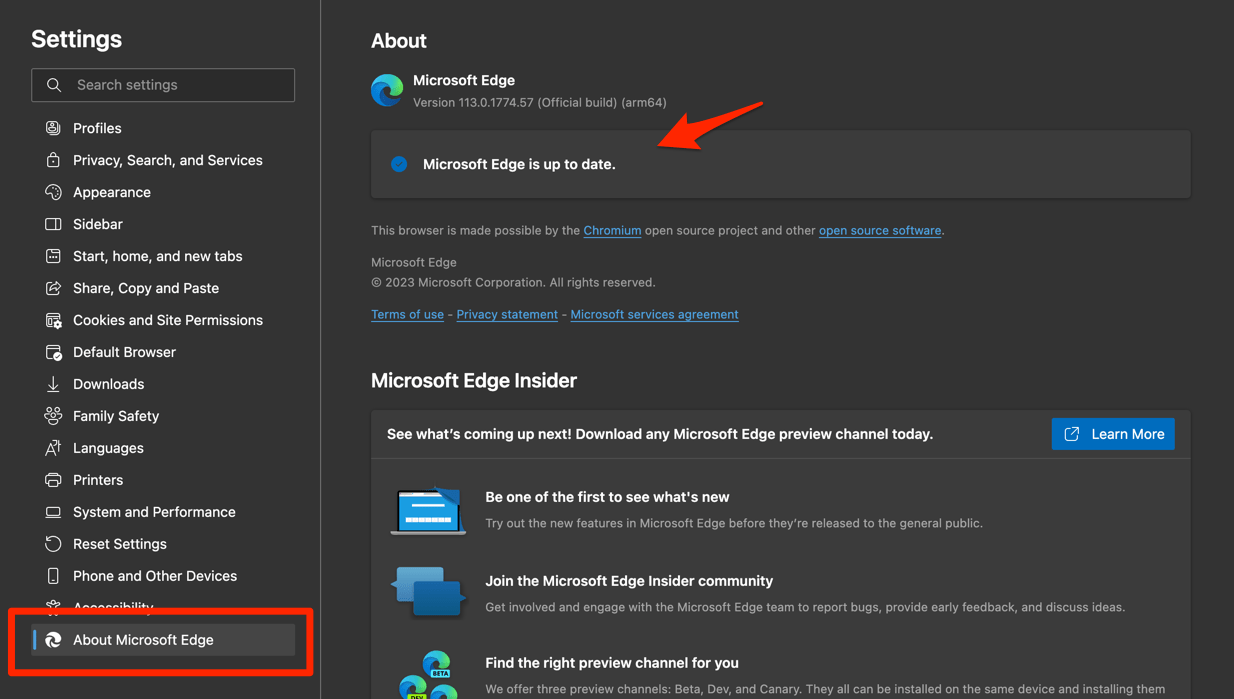 The Edge will automatically start checking for updates and installs, if any are available.
- Finally, hit the button if available after the (major) update.
Edge browser will be updated to the latest version.
You’ll know it worked when a fresh tab opens with the discovery layout Microsoft describes. Seeing the same old page? Give it a few days and check again, since the announcement gives no schedule.
The underlying tab controls have not changed. If you need a refresher, Open an InPrivate Window and New Tabs in Edge on a Computer covers them step by step.

Microsoft presents this as a new tab experience rather than a numbered Edge release, so the page itself is the practical availability check.
Checking the new tab on Android and iPhone
Your phone may not match your laptop. Microsoft does not list platform availability in the announcement, so do not assume the refresh has reached Android or iPhone just because it showed up on your desktop.
Open a new tab on each device you use and compare it with the official post. On Android, the tab basics are unchanged, and Open New Tabs and InPrivate Tabs in Edge browser on Android walks through them.

Frequently Asked Questions
What is changing in Microsoft Edge’s new tab?
The page becomes more discovery-focused. Instead of acting only as a launchpad, it is meant to help you find content that matters as the amount of material online keeps growing.
Why did Microsoft make this change to Edge?
Edge users said they wanted more help cutting through the volume of content online. That feedback is the stated reason discovery now sits at the center of the new tab experience.
How do I check whether my Edge has the new experience?
Update Edge on your computer, open a fresh tab, and compare what you see with the official announcement. There is no separate version-number test to run.
Does the announcement name an Edge version or rollout date?
No. Microsoft talks about the new tab experience rather than a numbered release, and no rollout schedule is given.
Is the refresh available on every Edge platform?
The announcement does not list platform availability. Check the new tab page on Android, iPhone, and any other device you use before assuming it has arrived.