When Reddit won't load in Chrome, the cause is usually bad cookies, a problematic extension, or Chrome's growing third-party cookie blocks. Start with the easy diagnostic (open an Incognito window) and work through the fixes below to get Reddit loading again on your computer.
Chrome's full reset path, clear-data dialog, and site-settings wording in this guide match the current three-dot menu. If one fix doesn't do it, the next one usually does.
In this guide, I have covered:
Contents
Why Reddit Stops Loading in Chrome
Reddit not working in Chrome usually looks like a blank screen, a partial layout without images, or a login that never completes. The cause is almost always one of three things: corrupted cookies, a Chrome extension that interferes with Reddit’s scripts, or Chrome’s third-party cookie blocks rejecting the session token Reddit uses to keep you signed in.
Other triggers include an out-of-date Chrome, a stale DNS cache in Chrome pointing at an old Reddit IP, or hardware acceleration breaking video playback. The fixes below start with the fastest diagnostic and work up to a full Chrome reset.
Test Reddit in an Incognito Window First
Open Reddit in an Incognito window first. This tells you whether the problem is your saved data or an extension.
- Launch the Google Chrome on your computer.
- Click on the More
 menu for the list.
 - Select the New Incognito Window option.
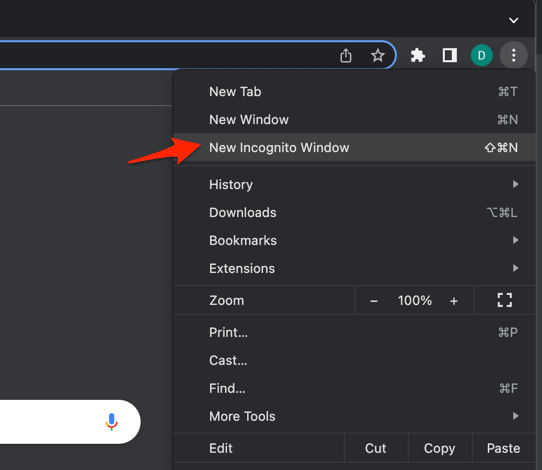 It will start a new incognito window in the browser.
If Reddit loads and scrolls normally in Incognito, the cause is something stored in your regular Chrome profile. See how to open an Incognito window in Chrome on a computer if you need the exact shortcut and menu path.
Clear Cookies and Cache in Chrome
Stale cookies for reddit.com are the most common reason Reddit shows you as signed out or refuses to load new posts.
- Open the Google Chrome on your computer.
- Click on the More for menu options, and hover on the More Tools menu.
- Select the Clear Browsing Data... sub-menu from the list.
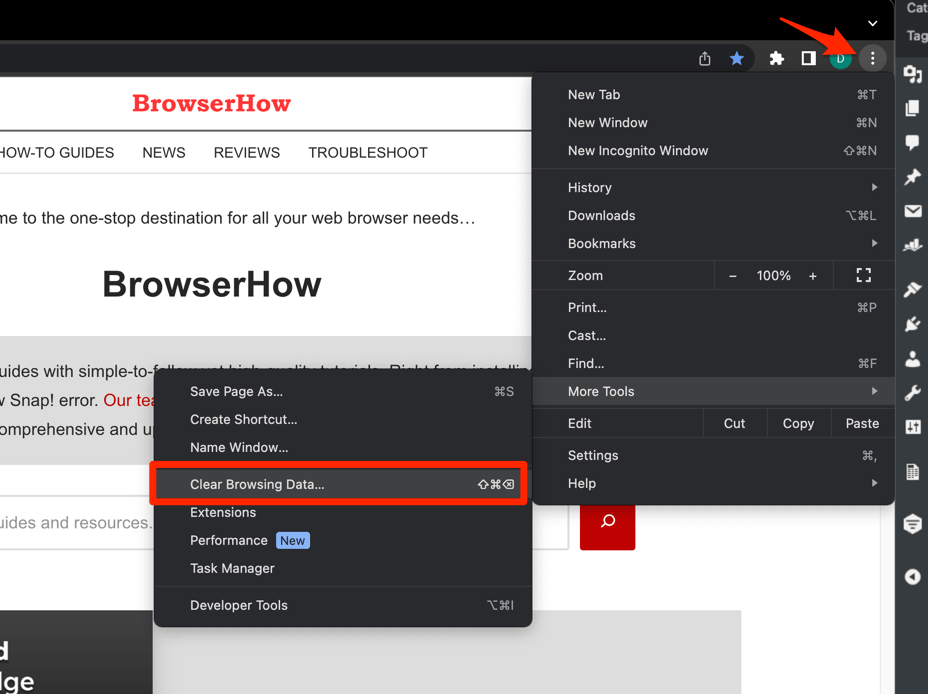 It will open the Clear browsing data settings window.
 - Choose the Time Range from the drop-down and select the checkboxes for the 'Cookies and other site data' and 'Cached images and files' options.
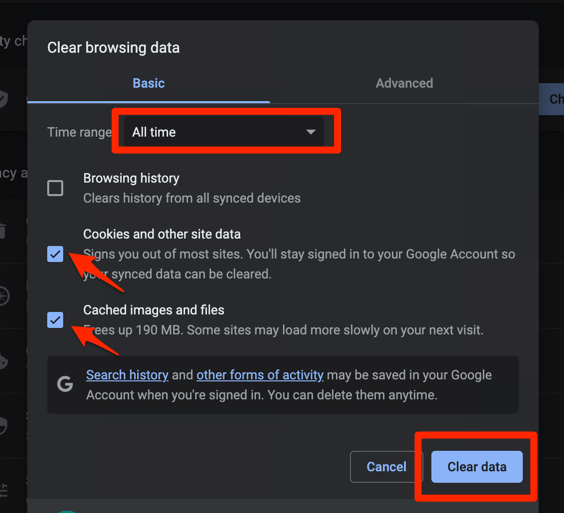
- Finally, hit the command button.
It will delete the stored cookies and cache data from your Chrome browser.
Set the time range to All time before deleting, then sign back in and confirm the feed loads. See how to clear cookies and cache in Chrome for a broader walkthrough.
Check Chrome’s Third-Party Cookie Settings
Reddit relies on third-party cookies for several features, including login state on embeds and the open-in-app prompt. Chrome has been progressively blocking third-party cookies by default for more users. If Reddit started acting up recently, this setting is worth confirming.
- Click at the top right of Chrome and choose .
- Select in the left sidebar.
- Click .
- Click .
- If the toggle is set to , switch it to or .
- Close the tab and reload reddit.com.
For more detail on this menu, see how to block or allow browser cookies in Chrome on a computer.

TIP: If you want to keep third-party cookies blocked but still use Reddit, add reddit.com and redditstatic.com as allowed sites under , , then in the “Sites allowed to use third-party cookies” section.
Disable Chrome Extensions
Ad blockers, script blockers, and privacy tools such as uBlock Origin, AdBlock, Ghostery, NoScript, Privacy Badger, and many VPNs often break Reddit’s feed, video player, or login flow.
- Launch the Google Chrome on your computer.
- Click on the More for the list menu.
- Hover on the More Tools menu and choose the Extensions sub-menu.
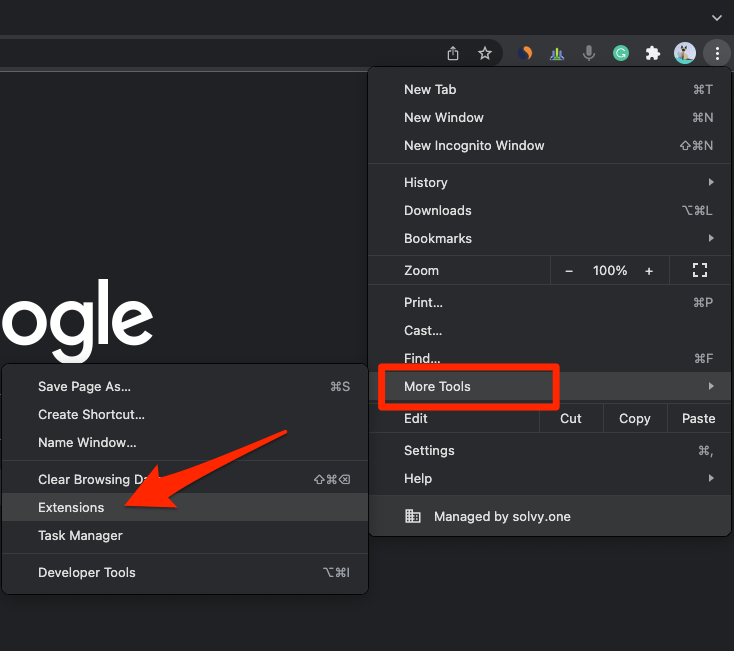 It will open the Chrome Extensions Manager page with the list of installed extensions.
 - Toggle the switch to Disable the extension.
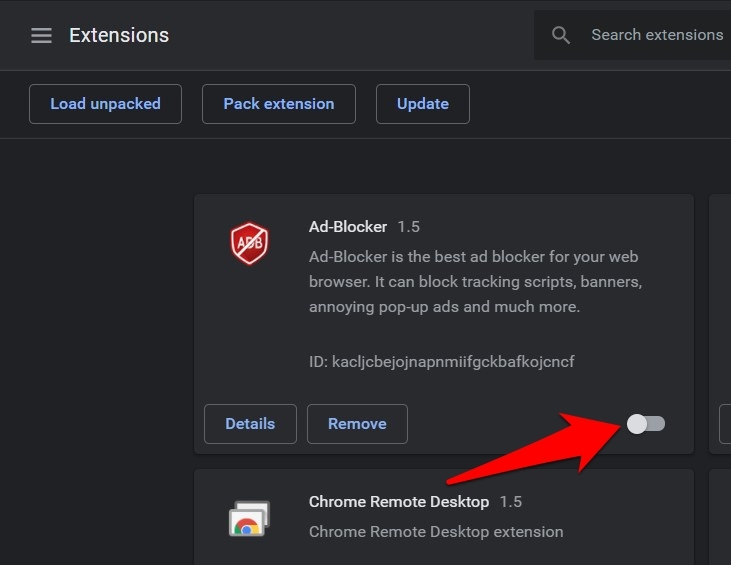
Disable every extension, reload Reddit, and if it loads, re-enable extensions one at a time to find the offender.
Clear Chrome’s Internal DNS Cache
Chrome keeps its own DNS cache separate from your operating system. If Reddit’s IP recently changed, Chrome will keep trying the old one and the site will refuse to connect.
- Launch Google Chrome on your Computer.
- Type in chrome://net-internals/#dns in the address bar, and hit key.
It will open the Chrome DNS network page. - Hit the command button.
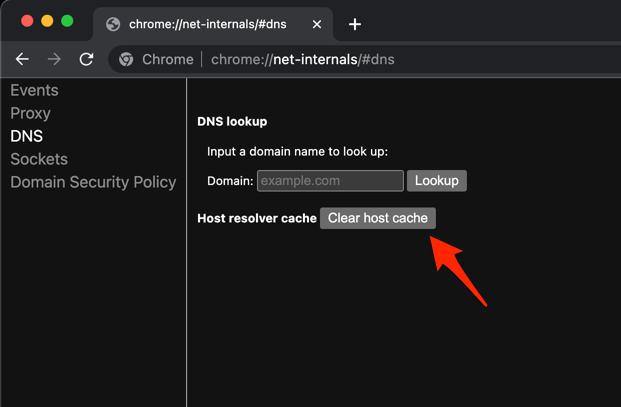
- Relaunch the Chrome browser.
It will clear the Chrome DNS host cache.
Close and reopen Chrome, then load Reddit again. The site should connect on the new DNS lookup.
Update Google Chrome
An out-of-date Chrome can mis-handle newer Reddit code, TLS certificates, or media formats. Chrome’s auto-updater can also be paused by a corporate policy or stalled in the background.
- Launch the Google Chrome on your computer.
- Click on More for the options list, and select the Settings menu.
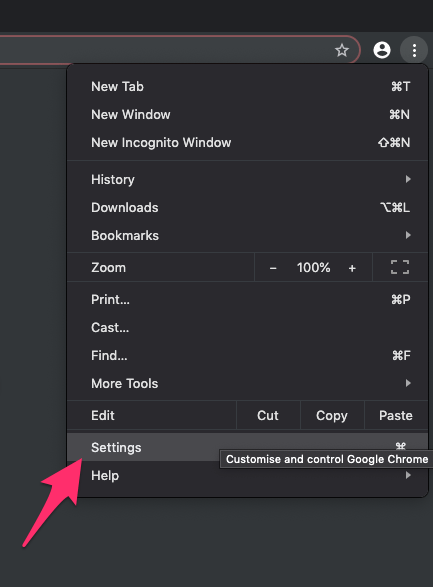
- Switch to the About Chrome tab in the left sidebar pane.
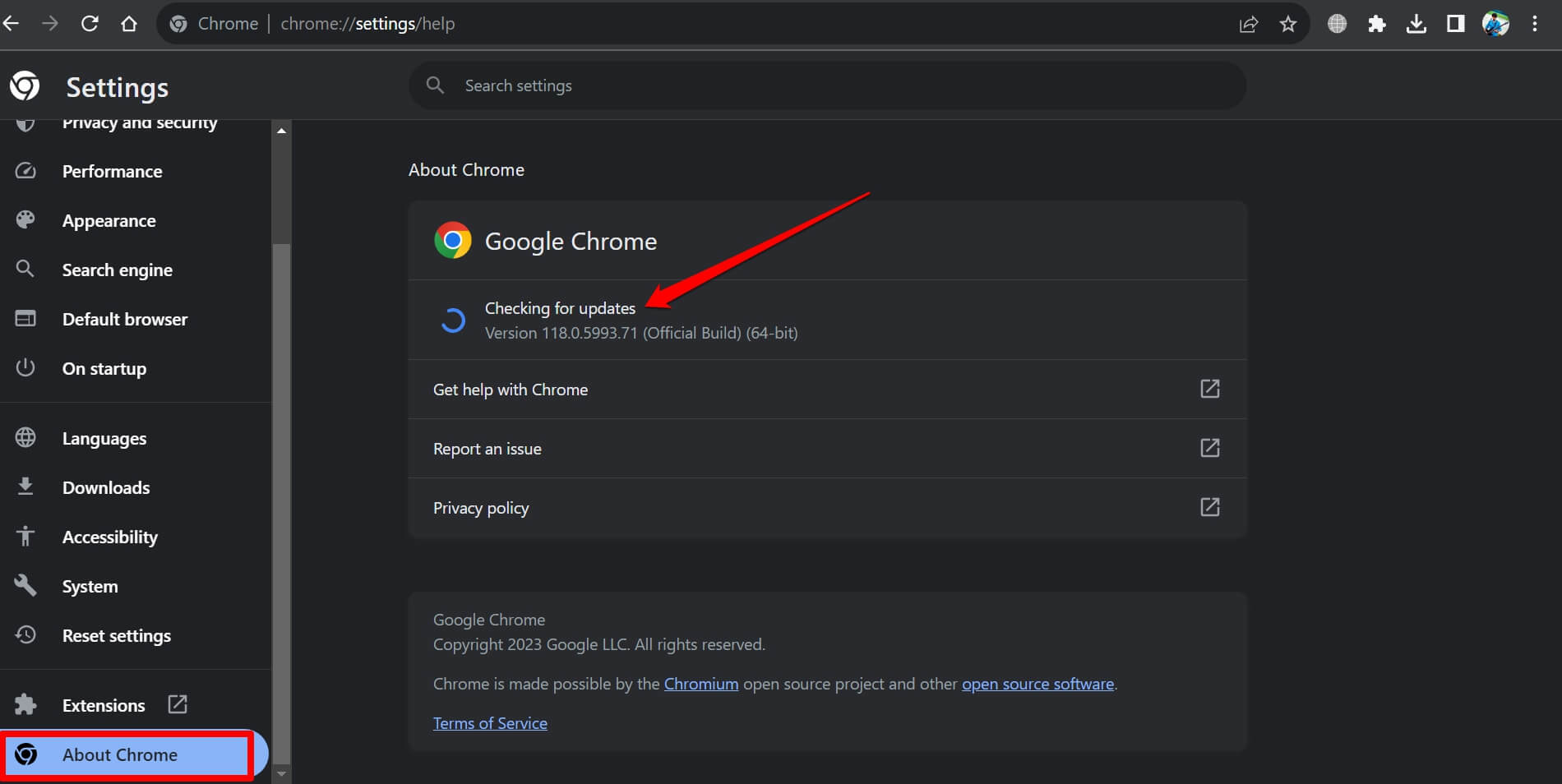 The browser should automatically start looking for the latest updates.
 - Hit on the button.
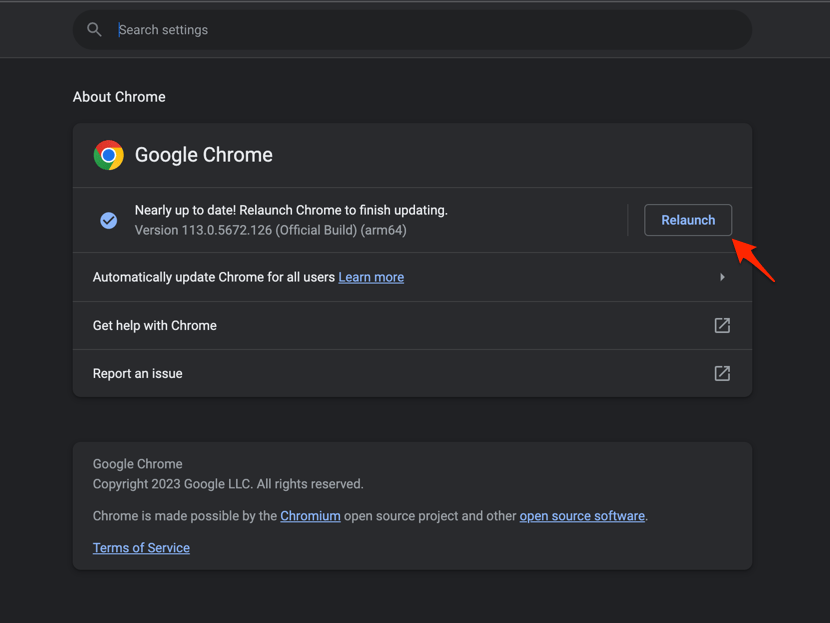 It will complete the Chrome browser update process.
After Chrome restarts, open Reddit and confirm posts, images, and embedded videos all load correctly.
Turn Hardware Acceleration Off (or On)
Hardware acceleration offloads rendering to your GPU. On some machines it causes Reddit videos, GIFs, and comment previews to flash black, freeze, or fail to play.
- Open Chrome Settings.
- Click System in the left sidebar. (If your Chrome still groups it under an expandable Advanced section, the path is Settings > Advanced > System.)
- Toggle Use graphics acceleration when available on or off, then relaunch Chrome.
Reload Reddit and try playing a video or GIF. If the issue was acceleration, the playback should now work normally.
Reset Chrome to Its Default Settings
If Reddit still will not load, the last resort is a full Chrome reset. It restores startup, search, new tab, pinned tabs, and content settings to defaults without deleting bookmarks, history, or saved passwords.
- Launch the Chrome browser on the computer.
- Click on the More for menu list, and select the Settings menu.
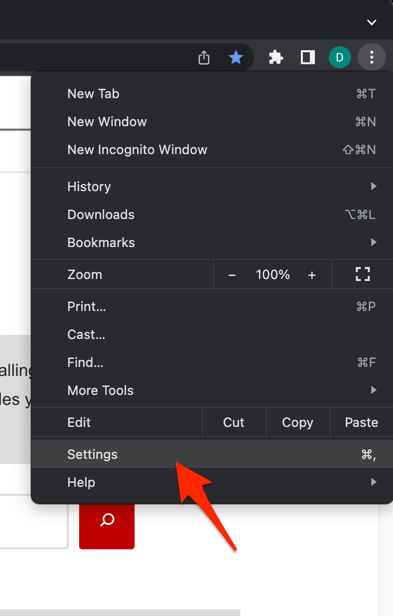 It will open the Chrome browser's Settings page.
 - Switch to the Reset settings tab in the left sidebar, and select Restore settings to their original defaults option.
- Finally, hit the command button.
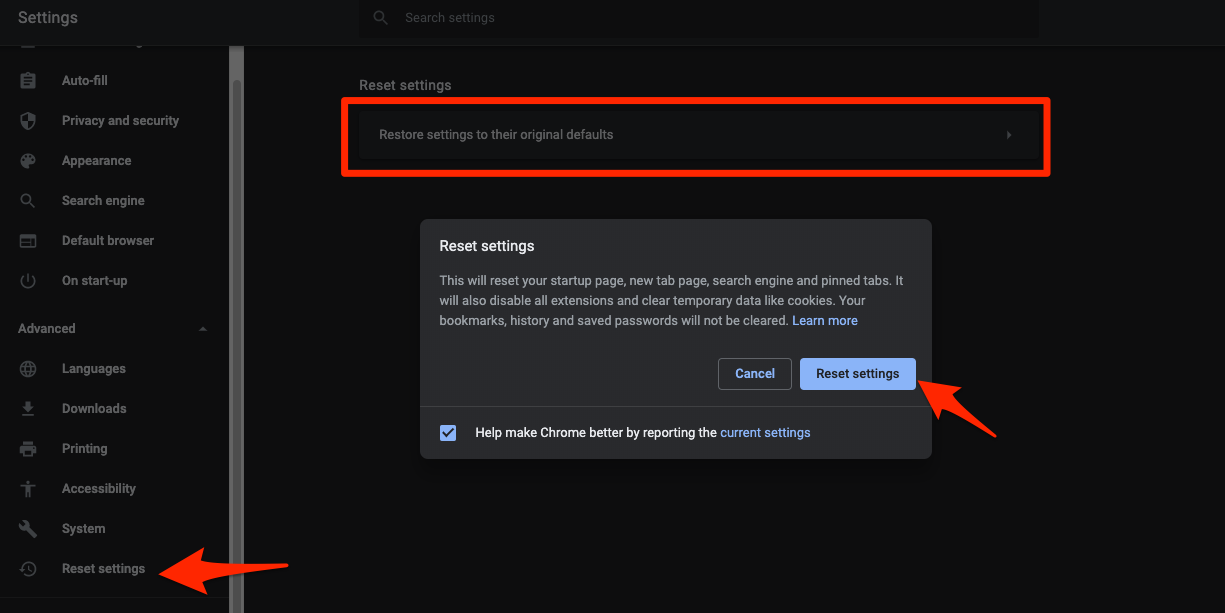 It will reset the Chrome browser settings, clear temporary data, and disable all extensions.

Resetting Chrome disables every extension and clears temporary site data. You will need to re-enable extensions you want to keep and re-sign in to most sites, including Reddit.
Other Fixes Worth Trying
If none of the Chrome-side fixes work, the problem is likely outside the browser. Run through these last checks before assuming Chrome is at fault.
- Open Reddit in another browser (Firefox, Edge, Safari) or on your phone. If it fails there too, check the official Reddit status page for an outage.
- Disable any VPN or proxy temporarily, then reload Reddit. Some VPN exit nodes are blocked by Reddit’s anti-abuse systems.
- Run a speed test at fast.com to confirm Reddit is reachable from your network.
- Restart your computer and your router. A stale DNS cache on the router can prevent Chrome from resolving reddit.com.
- Clear Chrome’s browsing history if Reddit’s redirect URLs still misbehave after a cookie clear. Stale history entries can keep bad redirects cached.

Frequently Asked Questions
Why does Reddit load in Firefox but not Chrome?
The most common reason is Chrome’s stricter third-party cookie handling. Firefox allows third-party cookies by default, while Chrome has been rolling out blocks to more users. Open chrome://settings/cookies and either allow third-party cookies or add reddit.com as an allowed site.
How do I clear cookies only for Reddit?
Open chrome://settings/content/siteData, search for “reddit”, click the trash icon next to every reddit.com entry, then click . This signs you out of Reddit without touching cookies for any other site.
Will resetting Chrome delete my bookmarks?
No. Chrome’s Restore settings to their original defaults option only resets startup, new tab, search engine, pinned tabs, content settings, and extensions. Bookmarks, history, and saved passwords are kept.
Why are Reddit images not loading in Chrome?
Most of the time this is a leftover cookie pointing at an old image host or a mixed-content block on redditmedia.com. Clear cookies and cache, then reload. If only specific posts fail, the image host for that post may be temporarily blocked by your network or VPN.
Can a Chrome extension really break Reddit?
Yes. Ad blockers, anti-tracking extensions, and script blockers often hide Reddit’s vote buttons, comment composer, or login buttons, and a few older extensions outright break the new Reddit interface. Disable extensions one at a time from chrome://extensions/ to identify the culprit.